SharePoint Workflow Governance: Automating Enterprise Approvals Securely
Approval workflow SharePoint systems are the backbone of enterprise process automation. Yet most organizations we work with lack a coherent governance framework to manage them at scale. Without structured governance, approval workflows become compliance liabilities, audit risks, and bottlenecks that slow decision-making instead of accelerating it. This guide walks you through building a scalable, auditable SharePoint approval workflow governance framework that enforces control without sacrificing speed.
Key Takeaway
Effective SharePoint workflow governance balances automation speed with audit transparency, enabling faster decisions without sacrificing control or compliance visibility.
In This Article
- Why Workflow Governance Matters for Enterprises
- The Core Governance Challenges Enterprises Face
- The Solution: SharePoint Workflow Governance Framework
- Key Components of a Governance-First Approval Workflow
- Common Governance Patterns by Enterprise Type
- Building Your Governance Strategy: A 5-Step Approach
- Frequently Asked Questions
Why Workflow Governance Matters for Enterprises
Enterprise organizations face unprecedented compliance scrutiny. Regulatory frameworks like SOX, GDPR, HIPAA, and industry-specific standards demand immutable audit trails, clear separation of duties, and documented approval rationale. Here’s the problem: most enterprises have dozens, sometimes hundreds, of approval workflows scattered across SharePoint. Each one follows different rules, escalation paths, and data retention timelines.
The result? A governance blind spot. When auditors ask, “Can you prove that all vendor payments above 10K were approved by authorized signers?”, the answer often becomes a weeks-long forensic effort across multiple systems. Without governance, workflows become shadow-IT processes, manual workarounds, and compliance risks.
“72% of organizations report difficulty in managing approval workflows across multiple departments and systems.”
Forrester Research, 2023
Here’s what we’ve seen: effective governance transforms approvals from a compliance problem into a competitive advantage. Standardized workflows reduce cycle time, eliminate bottlenecks, and provide real-time visibility into process health. On top of that, SharePoint approval workflow governance aligns with modern cloud-native architectures, enabling organizations to scale approval processes as they grow, acquire new teams, or expand into new regions.

The Core Governance Challenges Enterprises Face
We consistently see organizations encounter the same pain points when they attempt to govern approval workflows without a structured framework:
- No standardized approval logic. Each department defines its own rules, roles, and escalation paths. Finance approves by cost center; HR by employee grade; Procurement by vendor tier. Reconciling these inconsistencies at audit time becomes a nightmare.
- Orphaned workflows with unclear ownership. A workflow built three years ago still runs, but the original owner departed. No one knows if the approval rules are still valid or who should maintain them.
- Limited audit trails and compliance gaps. Many workflows lack immutable approval records, timestamps, or decision rationale. When regulators demand proof of approval, you discover critical data is missing or in inconsistent formats.
- Approval bottlenecks and escalation failures. Out-of-office approvers block workflows. Unclear delegation rules create confusion. Escalation paths are manual workarounds rather than designed logic.
- Data retention inconsistencies. Some workflows purge approval records after 30 days; others keep them indefinitely. You can’t demonstrate compliance with regulatory retention requirements because there’s no standard.
- Security gaps and over-permissions. Approver roles proliferate without separation-of-duties validation. A requester accidentally becomes an approver. Access reviews become chaotic.
- Difficulty scaling as the organization grows. Each new business unit creates new workflows. Governance frameworks that worked for 20 workflows break at 200. Scaling becomes a manual, error-prone effort.
The consequence is clear: without governance, you risk failed audits, leaked data, slow decision-making, and rework, all while claiming to have “automated” your approval processes.
The Solution: SharePoint Workflow Governance Framework
A well-designed SharePoint approval workflow governance framework addresses each of these pain points systematically. Here’s what matters most: governance starts with people and process discipline. Technology layers in the controls afterward to enforce and monitor those processes at scale.
Here’s how the right governance approach solves each challenge:
Standardization. Define approval templates, role hierarchies, and escalation rules centrally. When a new department needs an approval workflow, they adopt (or adapt) an existing template rather than inventing from scratch. This consistency makes audits faster and training simpler.
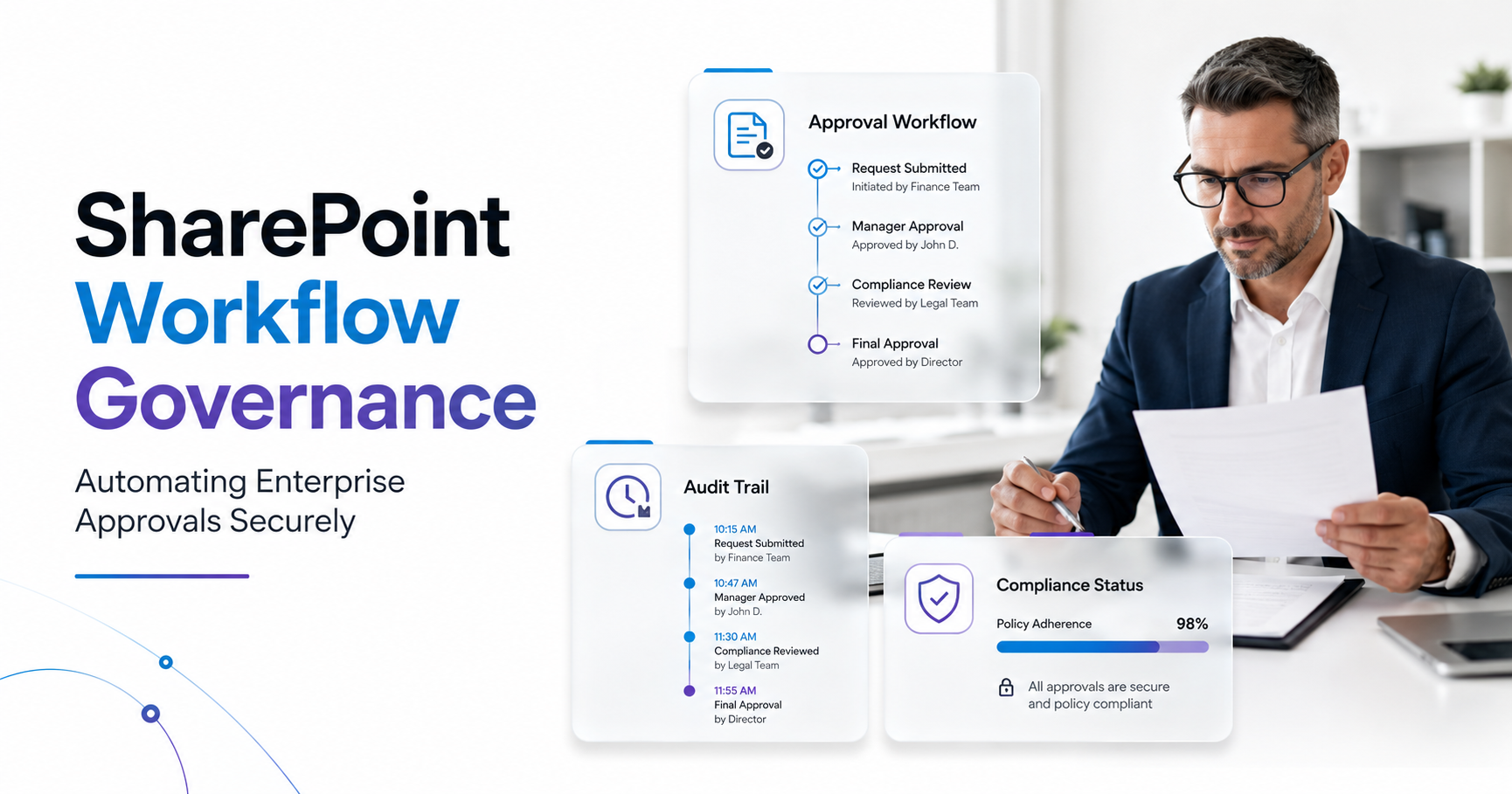
Visibility. Implement monitoring dashboards and audit logs for all approval activities. Real-time dashboards show average approval time by workflow, by department, and by approver. Alerts fire when approvals exceed SLA. Audit logs capture every approval decision, comment, and delegation, immutably.
Compliance. Enforce retention policies, duty segregation checks, and approval documentation automatically. When an approver leaves the organization, workflows automatically reassign to their replacement. When an approval reaches its retention deadline, the system automatically purges the record. No manual cleanup, no compliance gaps.
Scalability. Use governance policies that auto-apply to new workflows and business units. Add a new department, and it inherits the governance framework. No rework, no exceptions.
Performance. Monitor workflow duration, identify bottlenecks, and optimize step sequences based on real data. If expense approvals stall because one department lacks decision criteria, you see it and fix it.
Expert Perspective
Modern SharePoint approval workflows, combined with Power Automate and Microsoft Purview compliance controls, provide the technical foundation. Here’s the thing though: governance remains a people and process problem first. Technology enforces the rules, but leadership must define them, teams must adopt them, and governance teams must audit compliance.
What should you look for when evaluating a governance partner or platform? First, pre-built workflow templates aligned to common compliance frameworks (e.g., SOX-compliant expense approval, HIPAA-compliant access request). Second, real-time monitoring and alerting on approval bottlenecks or policy violations. Third, audit report generation, not just logs, but business-friendly compliance reports. Fourth, role-based governance controls so you can define who can create, modify, or approve workflows. Fifth, integration with Microsoft Purview for retention labeling, eDiscovery, and compliance reporting.
Key Components of a Governance-First Approval Workflow
A robust approval workflow governance framework rests on four pillars: role-based access, audit controls, performance monitoring, and policy enforcement.
Role-Based Access and Delegation
Define approver roles explicitly. Manager, Finance Lead, Compliance Officer, Procurement Director. For each role, establish who can assume it, who can temporarily delegate it, and for how long. When an approver is out-of-office, the system automatically escalates to a backup. Crucially, enforce separation of duties: a requester can’t approve their own request. An employee can’t approve their own raise or access request. The system blocks policy violations before they happen.
Audit and Compliance Controls
Maintain immutable approval records with timestamps, approver identity, decision, and full audit context. Integrate with Microsoft Purview to apply retention labels (e.g., “Finance Approvals: Retain 7 years, then delete”). When auditors ask for all approvals of purchase orders over 100K in the last fiscal year, you export a compliance-ready report in seconds, not weeks.
Performance and Monitoring
Build dashboards that answer: What’s the average approval time across all workflows? Which approver is the bottleneck? Which workflow type consistently misses its SLA? Use this data to identify optimization opportunities. If a workflow averages 12 days but the target is 5 days, investigate why. Is the criteria unclear? Is the approver overloaded? Does the workflow need a parallel approval path instead of sequential? Data-driven optimization beats guessing.
Policy Enforcement
Codify governance policies into workflow logic. If a purchase order exceeds 50K, it automatically routes to the VP of Finance for approval. If it exceeds 250K, it requires dual approval. If the approver has delegated their authority, the system follows the delegation chain. These rules are transparent, consistent, and auditable.
Common Governance Patterns by Enterprise Type
Finance and Accounting
Expense approvals typically require dual approval for amounts above a threshold (e.g., 5,000). Approval workflow SharePoint implementations in finance add compliance requirements: every dollar must be traceable to a cost center, approved by a manager, and verified against budget. The system automatically flags duplicate submissions, mismatched cost center allocations, and approvals from unauthorized signers. Audit trails must survive seven years of retention cycles.
Healthcare (HIPAA-Regulated)
Data access requests in healthcare demand approval workflow governance to meet regulatory timelines. A patient requests their medical records; the request routes to a compliance officer, who must approve or deny within 30 days. The system logs every access, every approval, and every denial. After the legally mandated retention period (typically six years), the system automatically purges the record. One audit failure on data retention can result in fines exceeding 1 million; governance prevents this.
Manufacturing and Supply Chain
Purchase order approvals require routing by order value and vendor type. A 10K order for a qualified vendor skips procurement review. A 10K order for a new vendor requires three approvers. Approval workflow SharePoint governance ensures routing logic is consistent across plants, suppliers, and regions. Real-time dashboards show procurement cycle time by region, helping identify bottlenecks and negotiate SLAs with suppliers.
Human Resources and Onboarding
New hire approvals involve parallel workflows: manager approval, HR clearance, IT security access provisioning. If any step stalls, the onboarding timeline extends. Governance frameworks define escalation: if HR hasn’t approved access within two days, notify the CHRO. If IT provisioning exceeds five days, alert the CIO. This transparency drives accountability and reduces time-to-productivity for new employees.

Building Your Governance Strategy: A 5-Step Approach
Implementing SharePoint workflow governance isn’t a big-bang project. Instead, follow an iterative, assessment-driven approach:
- Assess Current State. Audit all existing workflows in your organization. Map approval logic, stakeholders, data retention practices, and compliance requirements. Document orphaned workflows, inconsistent rules, and audit findings. Outcome: a governance baseline and risk register identifying high-priority workflows that need immediate attention.
- Define Governance Framework. Establish approval roles, escalation rules, compliance requirements, and performance targets for your organization. Reference industry standards like COBIT (IT governance) or ITIL (service management) if applicable. Document this as a governance policy. Outcome: a governance policy document that serves as your north star for all subsequent implementations.
- Design Workflow Templates. Create reusable, pre-configured approval workflow templates for common use cases (expense approval, purchase order, access request, data release). Each template embeds compliance rules, audit logging, and performance monitoring. Outcome: a template library that reduces variation and accelerates new workflow implementations.
- Implement Monitoring and Controls. Deploy dashboards, audit logging, and compliance reporting. Connect workflows to Microsoft Purview for retention management. Set up alerts for policy violations or SLA breaches. Outcome: real-time visibility into workflow health and compliance status across your organization.
- Operationalize and Iterate. Train approvers, workflow owners, and governance teams on the new framework. Establish governance review cycles (monthly, quarterly) to audit compliance, identify optimization opportunities, and adapt to changing business needs. Outcome: a sustainable governance culture and continuous improvement cycle.
This approach embeds governance gradually, reducing organizational disruption and building stakeholder buy-in as people see the benefits of clarity and reduced manual overhead.
Frequently Asked Questions
What’s the difference between SharePoint workflow governance and Microsoft workflow governance more broadly?
SharePoint workflow governance focuses specifically on approval workflows within the SharePoint ecosystem. Microsoft’s broader workflow toolset includes Power Automate, Logic Apps, and Azure Automation. For enterprises, governance frameworks often span all of these tools. This guide focuses on the approval workflow governance layer most relevant to SharePoint administrators managing document approvals, contract approvals, and access requests within SharePoint.
Can we implement SharePoint workflow governance without a third-party tool?
Yes, absolutely. You can implement governance using built-in SharePoint approvals, Power Automate standard connectors, Microsoft Purview retention policies, and SharePoint auditing. That said, large enterprises often add third-party monitoring and reporting tools to gain visibility into workflow health across hundreds of workflows. A third-party tool isn’t mandatory, it’s a scaling decision based on complexity and audit requirements.
How do we handle approver delegation without creating governance loopholes?
Define delegation rules upfront: who can delegate, to whom, for how long (e.g., “Manager can delegate to another Manager for up to two weeks”). Use approval actions that log every delegation. Audit regularly for unauthorized delegations. If a manager delegates to someone outside the approved list, the audit trail shows it immediately, and you can remediate. Governance isn’t about preventing all delegation, it’s about making delegation visible and controlled.
What compliance frameworks should our governance align with?
It depends on your industry. Finance and healthcare must align with SOX, HIPAA, and GLB Act. Enterprises handling personal data in the EU must comply with GDPR. Manufacturing and defense contractors may need ISO 27001 or NIST compliance. Public sector agencies often follow OMB guidance. Identify your relevant regulations, then map them to governance controls. Many controls (audit trails, role-based access, retention) apply across frameworks.
How do we measure whether our governance is effective?
Track metrics: approval SLA compliance percentage, audit findings count and severity, average approval cycle time, approver workload distribution, and governance policy adherence rates. For example, if 95% of approvals occur within SLA, policy violations are under 2%, and approvers distribute workload evenly, your governance is working. If metric performance declines, use audit data to diagnose the root cause.
Additionally, reference Microsoft’s official governance documentation for detailed control frameworks aligned to Microsoft 365 compliance standards. For broader enterprise governance principles, the ISACA COBIT framework provides industry-standard governance controls applicable to workflow and process automation.
Why SharePoint intranet development matters to governance: a well-governed intranet becomes the trusted hub for workflow communications, approval status updates, and compliance training. Poor intranet development strategies often result in scattered workflows and low adoption of governance practices. Pairing governance frameworks with a user-friendly intranet significantly accelerates adoption and effectiveness.
Ready to Govern Your Enterprise Approval Workflows?
Effective approval workflow governance reduces audit risk, accelerates decisions, and eliminates bottlenecks. Let’s assess your current workflow landscape and build a scalable governance framework tailored to your compliance requirements and business processes. Contact our governance experts to start your assessment today.