SharePoint Approval Workflow Automation Solutions
Custom Microsoft 365 approval workflows for faster, secure business approvals.
Every Microsoft 365 approval workflow is configured around your organization’s approval rules, ensuring secure routing, audit compliance, and seamless collaboration across SharePoint, Teams, Outlook, and Power Automate.
AscenWork delivers custom SharePoint workflow solutions that automate approvals, document routing, multi-level approval automation, business processes, and decision-making inside Microsoft 365. Every workflow is tailored to your business rules, integrates with Power Automate, Microsoft Teams, Outlook, and SharePoint Online, and provides complete visibility with audit trails, reminders, escalations, and real-time approval tracking.
See Your Workflow in Action
✅ Microsoft 365 Experts ✅ Enterprise Support
Automate every approval process across HR, finance, procurement, legal, operations, and document management using SharePoint and Microsoft 365.
Why Choose AscenWork
Every organization follows different approval rules, departments, and compliance requirements. Instead of forcing template-based workflows, we build custom SharePoint workflow solutions tailored to your approval hierarchy, business rules, and Microsoft 365 environment.Ready to Replace Email-Based Approvals With a Structured Workflow System?
Talk to our team about your approval requirements and discover how quickly we can deploy a Microsoft 365 native solution that fits your organization.
Request Your Free Workflow Demo
Why Manual Approval Processes Are Failing Your Business
Manual approval management creates hidden bottlenecks that slow decision-making, reduce visibility, and increase compliance risks. As organizations grow, email-based approvals become difficult to track, making it harder to maintain consistent approval processes across departments.
Approval Requests Get Lost in Email
When approvals live in email, there is no single source of truth. Requests get forwarded to wrong recipients, buried under unrelated messages, or simply forgotten. Critical business decisions wait days or weeks because no one has clear visibility into the queue.
Compliance Teams Cannot Produce Clean Audit Records
Regulators and internal audit teams require complete, timestamped records of every approval decision. When approvals happen across email threads, WhatsApp messages, and verbal conversations, assembling a proper audit trail becomes a manual, time-consuming exercise that is never fully reliable.
Approvers Have No Consistent Process
Finance runs approvals differently from HR. Procurement has its own email templates. Legal uses a shared drive. As a result, Without standardized approval workflows, every department follows different approval methods, creating inconsistent decisions, delays, and unnecessary compliance risks.
Key Approvers Create Single Points of Failure
When the one person authorized to approve a vendor invoice or a leave request is traveling or unavailable, everything stops. Without a structured delegation system, organizations lose hours or days of productive time waiting for a single person to respond.
No Real-Time Visibility Into Approval Status
Operations managers, finance controllers, and HR business partners spend significant time chasing approval status updates. This time adds no value. It simply compensates for a process that was never designed to be transparent.
The Solution: Microsoft 365 Approval Workflow Automation
These challenges disappear when approvals are managed through a Microsoft 365 approval workflow. Instead of relying on email threads and manual follow-ups, requests follow predefined approval rules, automated routing, audit trails, and real-time status tracking inside SharePoint.SharePoint Approval Workflow Solutions Built Inside Your Microsoft 365 Environment
AscenWork designs and deploys custom SharePoint workflow solutions natively on SharePoint Online. Our solutions leverage your existing Microsoft 365 infrastructure, integrate directly with Teams and Outlook, and connect to your Active Directory for user and role management.
Unlike standalone workflow software, Microsoft 365 approval workflows run entirely within your existing Microsoft ecosystem, allowing employees to approve requests directly from SharePoint, Microsoft Teams, and Outlook without switching platforms.
There is no external software platform to manage. There is no third-party SaaS tool requiring separate licensing. Every approval request, decision record, and audit log lives securely inside your Microsoft 365 tenant, governed by your own data policies and security controls.
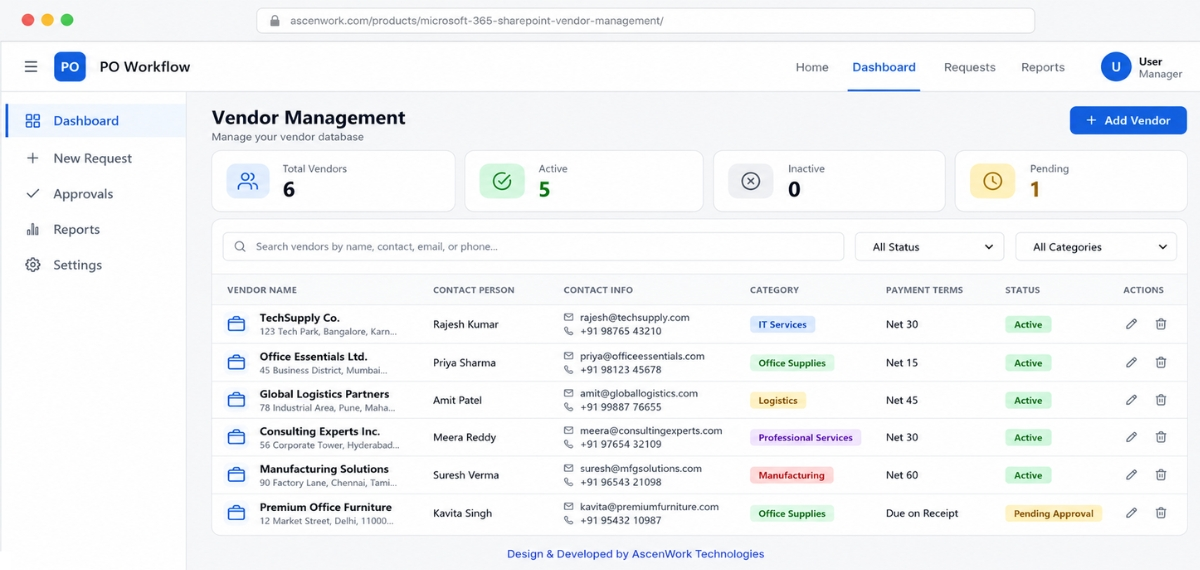
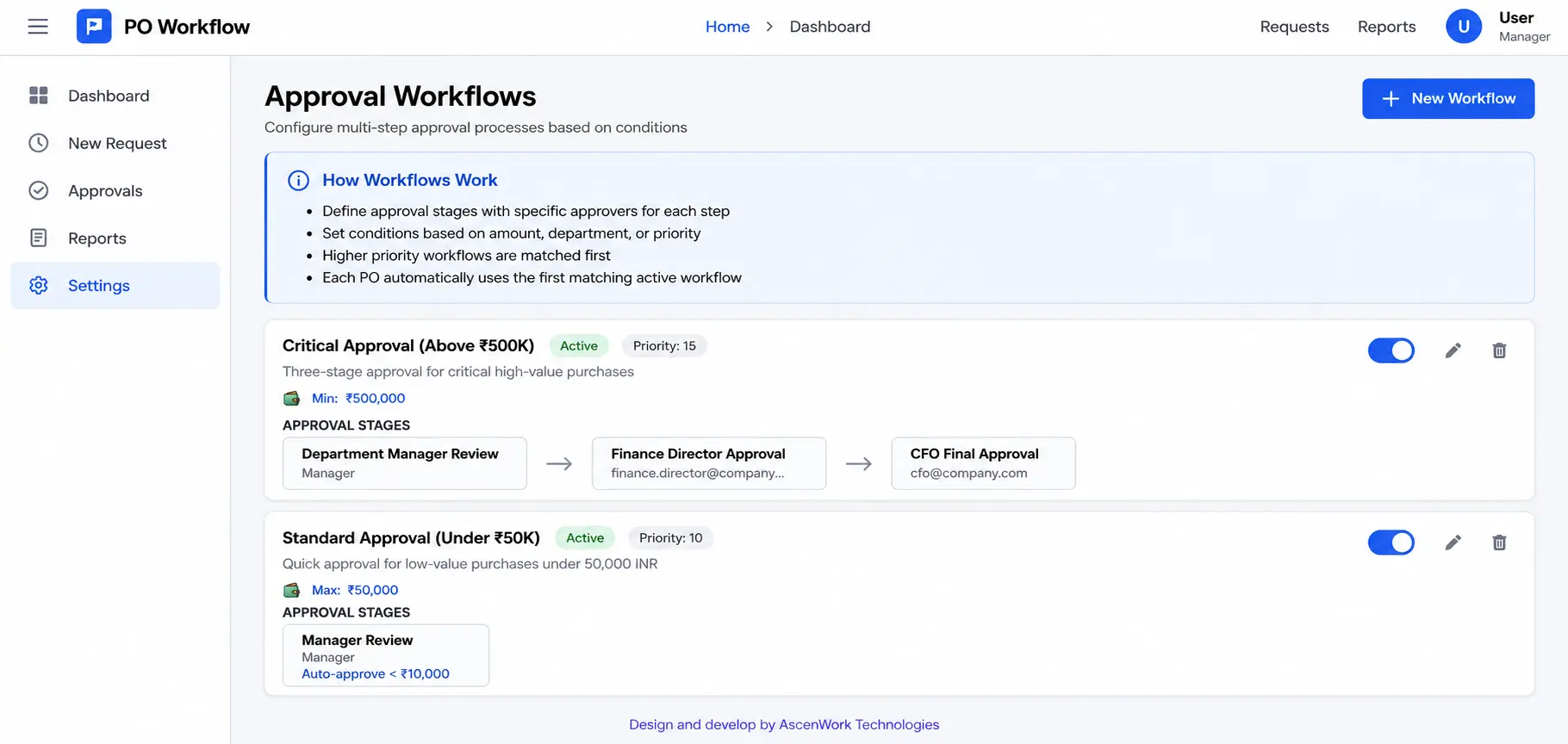
Our solutions are built to support everything from simple document approvals to complex multi-level approval automation with conditional routing, department-based approvals, escalation rules, and approval delegation inside Microsoft 365.
Join 50+ Organizations That Have Automated Their Approval Processes
✔ Microsoft 365 Native ✔ No Additional Workflow Licensing ✔ Enterprise Ready
Our clients have moved from email chains and manual tracking to structured, auditable, automated approval systems. Your organization can do the same.
What Happens After You Contact Us
- We respond within 24 hours to schedule a workflow consultation (30–60 minutes)
- During the call, we listen to your requirements and ask the right questions
- Within 48 hours, we send a clear proposal with scope, multi-level approval automation, timeline, and fixed-price investment
- You review, ask questions, and decide – with no obligation
See the Solution in Action
Our SharePoint Approval Workflow Development and Automation Services
AscenWork provides end-to-end SharePoint approval workflow services-from workflow discovery and custom solution design to Microsoft 365 deployment, user training, and long-term support. Every implementation is tailored to your approval processes, compliance requirements, and business rules. Every service is delivered using Microsoft 365 best practices and supports custom SharePoint workflow solutions for organizations of every size.
Custom Approval Workflow Design
Before any configuration begins, our team maps your existing approval processes, identifies bottlenecks, and documents the routing logic your organization requires. We account for multi-level approvals, conditional paths based on amount or category, and department-specific variations. The result is a workflow architecture that reflects how your business actually operates. This design phase ensures that the deployed solution.
SharePoint Online Deployment and Configuration
Our developers deploy the workflow application directly to your Microsoft 365 tenant. We configure approval routing rules, notification templates, dashboard layouts, delegation settings, and permission structures based on your approved design. You retain full administrative control throughout. Deployment is structured, well-documented, and completed with minimal disruption to your team’s day-to-day operations.
User Training and Onboarding
A well-built workflow system only delivers results when your team uses it confidently. Our training program covers the requestor journey, the approver experience, the administrator configuration panel, and the reporting dashboard. We follow a train-the-trainer model, equipping your internal champions to support ongoing adoption. We provide full documentation alongside every training delivery.
Ongoing Support and Annual Maintenance Contract
After go-live, your organization is not on its own. AscenWork offers Annual Maintenance Contracts that cover bug resolution, system updates, and ongoing configuration support. Our support team handles issues via a structured ticketing process, with defined response timelines for different severity levels. This model gives your IT and operations teams confidence that the workflow investment continues to perform over the long term.
Microsoft 365 Approval Workflow Capabilities
Our SharePoint approval workflow solutions are built to work across the full Microsoft 365 and Power Platform ecosystem. Each capability is designed to deliver a specific business outcome, not simply add a feature to a list.
Multi-Level Approval Automation
Automate approvals across multiple departments, approvers, roles, and decision stages using configurable routing rules inside Microsoft 365.
Conditional and Amount-Based Routing Logic
Different requests should follow different approval paths. A purchase request below a defined threshold might require only one approval level, while a higher-value request automatically.
Dynamic Approver Addition by Requestor
In some scenarios, the requestor knows that a specific person should review a particular request, even if that person is not part of the standard approval chain.
Real-Time Approval Status Dashboard
Administrators have a comprehensive overview across all open workflows. Status indicators, timestamps, and current approval stage are visible at a glance.
Mobile Approval Experience
Approve requests securely from Microsoft Teams, Outlook, or mobile devices without logging into multiple systems. Decision makers can review, approve, reject, or request changes from anywhere.
Automated Email and Teams Notifications
When a request reaches their queue, approvers receive an automated notification via email and, where configured, a Microsoft Teams message.
Approval Delegation for Absent Approvers
When an approver is unavailable, the delegation feature allows them to assign their approval responsibilities to a designated substitute for a specified period.
Complete Audit Trail and Compliance Records
Every approval decision, query, rejection, and comment is recorded with a timestamp and the identity of the actor. The audit trail is complete, and stored within your SharePoint tenant.
Power BI Reporting and Workflow Analytics
Beyond individual request tracking, our workflow solutions integrate with Power BI to deliver aggregate performance reporting.
SLA Tracking and Escalation
Automatically monitor approval turnaround times using configurable SLA rules. Escalate overdue approvals, notify managers, and maintain consistent approval performance across departments.
See Every Capability in Action Before You Decide
Our workflow demo covers the full approval journey, from request submission through multi-level routing, notification, decision, and reporting. Book your session today.
Book a Free Workflow Demo
Approval Workflow Use Cases Across Your Organization
SharePoint approval workflow automation helps organizations standardize approval processes across finance, procurement, HR, legal, IT, and compliance teams. The following use cases represent common Microsoft 365 approval workflow deployments implemented for our clients.
Finance and Invoice Approval Automation
Finance teams manage high volumes of vendor invoices, expense claims, and payment authorizations
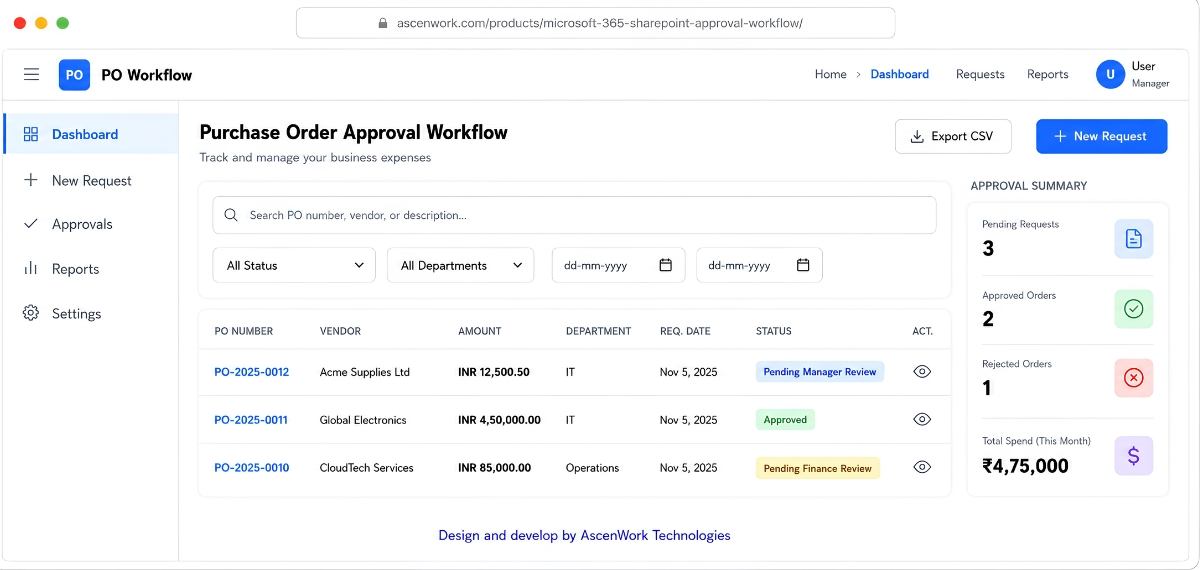
Procurement and Purchase Order Approval
Procurement teams require structured authorization processes for vendor selection.
HR Leave policy and Onboarding Approvals
Human resources processes generate significant volumes of approval requests across leave management.
Contract and Legal Document Approval
Legal and contract approval processes involve multiple reviewers, sequential sign-off stages, and strict documentation requirements.
IT Change Management Approvals
IT departments managing infrastructure changes, software deployments, and access requests require structured change approval processes that align with ITIL governance standards.
Compliance and Policy Approval Workflows
Organizations in regulated industries require documented approval processes for policy documents, risk assessments, and compliance declarations.
Does Your Industry Have Specific Workflow Requirements?
Our Microsoft 365 approval workflow solutions are tailored for manufacturing, financial services, healthcare, retail, and professional services. Every implementation is configured around your industry’s approval rules, compliance requirements, and operational processes.
Talk to a Workflow Specialist
How We Implement Your Custom Approval Workflow
Our implementation process is structured, transparent, and designed to minimize disruption to your team’s operations. From the first discovery conversation to go-live, every stage has a defined scope and timeline.
Step 1 - Workflow Discovery and Requirements Mapping
We begin with a structured discovery session covering your current approval processes, pain points, routing requirements, and compliance obligations. Our team documents the approval architecture, identifies all stakeholder roles, and maps the conditional logic required for each workflow type.
This phase produces a detailed requirements document that serves as the foundation for everything that follows.
Step 2 - Architecture Design and Approver Configuration
Based on the discovery outputs, our architects design the Microsoft 365 approval workflow, configure the approver hierarchy, approval routing logic, notification templates, and delegation rules. You review and approve the design before development begins.
No assumptions are made. Every configuration decision is documented and agreed before implementation starts.
Step 3 - Development, Configuration, and Quality Assurance
Our development team builds the workflow application within your Microsoft 365 tenant, configures multi level approval automation, routing logic, conditional approval paths, escalation rules, and notification workflows. QA covers edge cases, delegation scenarios, notification delivery, and dashboard accuracy.
You receive a testing environment for your own review before the solution goes live.
Step 4 - User Training and Acceptance Testing
We conduct structured training sessions covering the requestor, approver, and administrator roles. Your designated internal champions participate in a train-the-trainer program, ensuring your team can support adoption independently after go-live.
User acceptance testing runs during this phase, allowing your team to validate the deployed solution against real workflows.
Step 5 - Go-Live and Ongoing Support
Following successful acceptance testing, your custom SharePoint workflow solution is deployed across your Microsoft 365 environment. Our team provides hypercare support before transitioning to long term maintenance and enhancement services.
Your organization is fully supported throughout the launch and beyond.
Why Organizations Choose AscenWork for Approval Workflow Development
Choosing the right approval workflow solution is not just about automation. It is about maintaining security, supporting business specific approval rules, and delivering a Microsoft 365 solution that your team can manage long term without unnecessary licensing or platform changes.
Why Choose a Microsoft 365 Native Approval Workflow?
Microsoft 365 native approval workflows keep business data inside your existing tenant, reduce third party software dependencies, and provide better integration with SharePoint, Teams, Outlook, and Power Automate.
Your Data Never Leaves Your Microsoft 365 Environment
AscenWork approval workflow solutions are deployed entirely within your SharePoint Online tenant. Our team does not host your data, access your organizational records, or require any information to leave your Microsoft 365 environment. All application data is governed by your existing Microsoft 365.
Faster Delivery Without Compromising Customization
Our workflow solutions are built on a productized SharePoint application base that our team has refined across dozens of client deployments. This means we configure a proven, battle-tested foundation to your specific requirements rather than building from scratch.
Built on Microsoft-Certified Enterprise Infrastructure
SharePoint Online, Power Automate, Microsoft Teams, and Azure Active Directory are enterprise-grade platforms trusted by hundreds of millions of users globally. Our solutions leverage this infrastructure directly.
Business Ready Approval Workflows
Every custom SharePoint workflow solution is designed around your existing approval policies, departments, and compliance requirements. We adapt the workflow to your business instead of asking your team to change established processes.
● 50+ Organizations ● 100+ Workflow Deployments ● Microsoft 365 Specialists ● Enterprise Support
Trusted by Organizations Worldwide
AscenWork delivers Microsoft 365 approval workflow solutions for organizations across manufacturing, financial services, healthcare, retail, and professional services. Our custom SharePoint workflow solutions help businesses automate complex approval processes while maintaining security, compliance, and complete audit visibility.
✔ Microsoft 365 Experts ✔ 50+ Workflow Deployments
The implementation was structured and professional. Our team was trained thoroughly, and the AscenWork support team has been responsive to every post-launch question we have raised.

IT Manager
Before AscenWork, our finance team was managing invoice approvals across email threads, spreadsheets, and WhatsApp messages. Today, Every approval now follows a structured Microsoft 365 approval workflow with complete visibility and audit history.
Finance Director
We needed a custom SharePoint workflow solution that stayed within our Microsoft environment for data compliance reasons. AscenWork was the only vendor that could genuinely deliver this without compromise.
Operations Head
Need Custom SharePoint Workflow Solutions?
See how a Microsoft 365 approval workflow can automate your approval process with a personalized live demonstration.
Book My Microsoft 365 Workflow Demo
Frequently Asked Questions About SharePoint Approval Workflow
A SharePoint approval workflow is a Microsoft 365 business process that automatically routes approval requests through predefined approvers, records every decision, maintains complete audit history, and provides real time visibility into approval status.
Microsoft 365 approval workflow automation uses SharePoint Online as the application and data layer, Power Automate as the routing and logic engine, and Teams or Outlook for notifications.
Multi-level approval workflow routes a single request through sequential approval stages, where each stage requires a decision before the request advances to the next level.
Yes. SharePoint approval workflows built with Power Automate support conditional routing logic based on any combination of request parameters, including amount thresholds, request categories, geographic location, department, or requestor role.
Most Microsoft 365 approval workflow projects are completed within four to six weeks depending on workflow complexity, integrations, and testing requirements.
All AscenWork approval workflow data resides entirely within your Microsoft 365 SharePoint Online tenant. AscenWork does not host, store, or access your organizational data.
AscenWork approval workflow solutions require active SharePoint Online licenses, which are included in Microsoft 365 Business Basic, Business Standard, Business Premium, and all Microsoft 365 E-plan enterprise licenses.
Yes. Our workflow solutions integrate with Microsoft Teams to deliver approval notifications and action prompts directly within the Teams interface.
Our workflow solution includes a delegation feature that allows approvers to assign their responsibilities to a designated substitute for a defined period.
The primary difference is data residency and integration depth. Generic SaaS workflow tools require your data to be stored on the vendor’s platform infrastructure. AscenWork’s solution lives entirely within your Microsoft 365 tenant.
Yes. Our workflow solutions are configurable to the specific requirements of any industry or organizational structure.