SharePoint Migration Services Company
Migrate to SharePoint Online with Confidence
Modernize your digital workplace with expert SharePoint Migration Services designed for organizations moving from legacy SharePoint environments, file servers, and outdated document management systems to SharePoint Online.
We help businesses plan, execute, and optimize SharePoint migrations without disrupting day-to-day operations. whether you are migrating from SharePoint 2013, SharePoint 2016, SharePoint 2019, file servers, or another document repository, our structured migration methodology helps reduce risk, preserve business-critical content, and accelerate user adoption.
Why Organizations Choose AscenWork for SharePoint Migration
✓ 600+ SharePoint Projects Delivered
✓ 18+ Years Enterprise Technology Experience
✓ Microsoft 365 & SharePoint Specialists
✓ Proven Migration Methodology
✓ Zero Data Loss Migration Approach
✓ SharePoint 2013, 2016, 2019 & SharePoint Online Migration
✓ Comprehensive Content Audit & Migration
✓ Secure Permissions, Metadata & Version History Migration
✓ Minimal Downtime with Phased Migration Execution
✓ Post-Migration Governance & Support
Trusted by Enterprises Across Industries






Our SharePoint migration team has worked with organizations ranging from growing businesses to enterprise environments with thousands of employees. We as a SharePoint Development Company understand that every migration project is different. Therefore, we focus on business outcomes, not just moving files from one platform to another. Organizations trust AscenWork because we combine technical migration expertise with business process understanding. As a result, our clients receive a migration strategy that supports collaboration, compliance, productivity, and future growth.
Understanding SharePoint Migration
What is SharePoint Migration?
SharePoint migration Guide is the process of moving documents, sites, permissions, workflows, metadata, and business applications from older SharePoint environments or legacy systems into a modern SharePoint Online platform. A successful migration involves much more than moving files. It includes architecture planning, governance improvements, content cleanup, user adoption planning, and long-term platform optimization.
Why Do Businesses Migrate to SharePoint Online?
Organizations migrate to SharePoint Online to improve collaboration, strengthen security, reduce infrastructure costs, and take advantage of Microsoft 365 capabilities. Modern SharePoint environments integrate seamlessly with Microsoft Teams, Power Automate, Power Apps, Power BI, and Microsoft Copilot, creating a connected digital workplace that supports both productivity and compliance.
How Long Does a SharePoint Migration Take?
Most SharePoint migration projects take between 4 and 16 weeks depending on content volume, customization complexity, governance requirements, workflow dependencies, and business priorities. Smaller migrations can often be completed quickly, while enterprise environments require a phased migration approach to minimize disruption.
Our SharePoint Migration Services
Every organization has unique migration requirements. Therefore, our SharePoint migration services are tailored to your existing environment, business processes, compliance requirements, and long-term digital workplace goals.
SharePoint Server to SharePoint Online Migration
Many organizations still operate on aging SharePoint Server environments that are expensive to maintain and difficult to scale. We help businesses migrate from SharePoint Server to SharePoint Online while modernizing information architecture, improving security, and reducing infrastructure costs.
Included Services
- Content assessment and inventory
- Site structure redesign
- Permission mapping
- Metadata planning
- Workflow modernization
- User adoption support
- Post-migration optimization
Legacy SharePoint to SharePoint Online Migration
Many organizations continue to operate legacy SharePoint environments that were deployed years ago and are now becoming difficult to maintain, secure, and scale. Our SharePoint migration specialists help businesses move from older SharePoint versions to SharePoint Online while preserving business-critical content, permissions, metadata, version history, workflows, and governance requirements. Whether you are running SharePoint 2013, SharePoint 2016, SharePoint 2019, or SharePoint Subscription Edition, we follow a structured migration methodology designed to minimize downtime, reduce risk, and improve long-term platform performance.
Supported SharePoint Migration Scenarios
| Migration Source | Support Status | Typical Migration Scope |
|---|---|---|
| SharePoint 2013 | ✓ Fully Supported | Sites, Document Libraries, Metadata, Permissions, Version History and Content Structures |
| SharePoint 2016 | ✓ Fully Supported | Content Migration, Information Architecture Improvements, Security Modernization and Governance |
| SharePoint 2019 | ✓ Fully Supported | SharePoint Online Modernization, Workflow Transformation, Metadata Optimization and Compliance Enhancements |
| SharePoint Subscription Edition | ✓ Fully Supported | Hybrid Migration Planning, Cloud Migration, User Adoption Strategy and Platform Modernization |
| File Server to SharePoint Online | ✓ Fully Supported | Folder Structures, Document Libraries, Permissions Mapping, Metadata Design and Content Classification |
| Microsoft 365 Tenant Migration | ✓ Fully Supported | SharePoint Sites, OneDrive, Microsoft Teams, Permissions, Collaboration Data and Tenant Consolidation |
File Server to SharePoint Migration
File servers often create document duplication, inconsistent permissions, and poor search experiences. We help organizations migrate from traditional file servers to SharePoint Online, creating a structured document management environment with governance and compliance controls.
Outcomes
- Centralized document management
- Improved document search
- Better version control
- Secure access management
- Reduced duplicate content
Microsoft 365 Tenant Migration
Organizations undergoing mergers, acquisitions, restructuring, or tenant consolidation often require complex migration planning. We help businesses migrate SharePoint content between Microsoft 365 tenants while maintaining permissions, metadata, and governance controls.Benefits of SharePoint Online Migration
Migrating to SharePoint Online is not simply a technology upgrade. It is an opportunity to improve how your organization manages information, collaborates, and supports business growth.
Improved Collaboration
Employees can access documents, resources, and knowledge from anywhere in real time.
Enhanced Security
Microsoft continuously updates security controls, helping organizations reduce risk and improve compliance.
Lower Infrastructure Costs
Cloud-based environments eliminate the need for maintaining costly on-premise infrastructure.
Better Governance
Organizations gain stronger control over document lifecycle management, permissions, retention policies, and compliance processes.
Microsoft 365 Integration
SharePoint Online works seamlessly with Microsoft Teams, Power Automate, Power Apps, Power BI, Microsoft Graph, and Microsoft Copilot.
Future-Ready Platform
Businesses gain a scalable platform that supports digital transformation initiatives and evolving to the business requirements.
Common SharePoint Migration Challenges We Solve
Migrating to SharePoint Online involves much more than transferring documents from one platform to another. Many organizations face challenges related to permissions, metadata, workflows, governance, and user adoption. Our migration specialists identify and resolve these challenges before they impact business operations.
Legacy SharePoint Customizations
Broken Permission Structures
Metadata and Information Architecture Issues
Large Content Volumes
User Adoption Challenges
Migration Tools & Technologies We Use
Successful SharePoint migration projects depend on selecting the right tools and technologies. Our consultants use industry-proven migration platforms combined with Microsoft technologies to deliver secure, reliable, and efficient migrations.
Microsoft SharePoint Migration Tool (SPMT)
Microsoft’s native migration solution designed for moving content from file shares and SharePoint Server environments into SharePoint Online.
ShareGate
One of the most widely used enterprise migration platforms. ShareGate helps streamline content migration, permissions mapping, reporting, governance, and tenant-to-tenant migration projects.
Microsoft 365
Our migration solutions are designed around the broader Microsoft 365 ecosystem, enabling organizations to maximize value after migration.
Microsoft Teams
Integrated collaboration and communication platform connected directly to SharePoint Online.
Power Automate
Used to modernize legacy workflows and automate business processes after migration.
Power Apps
Allows organizations to replace outdated forms and legacy business applications with modern low-code solutions.
Power BI
Provides business intelligence and reporting capabilities using SharePoint-based data sources.
Microsoft Graph API
Enables advanced integrations, automation, and modern business application development.
Azure Active Directory
Supports identity management, security controls, conditional access policies, and user provisioning.
Real SharePoint Migration Results Delivered
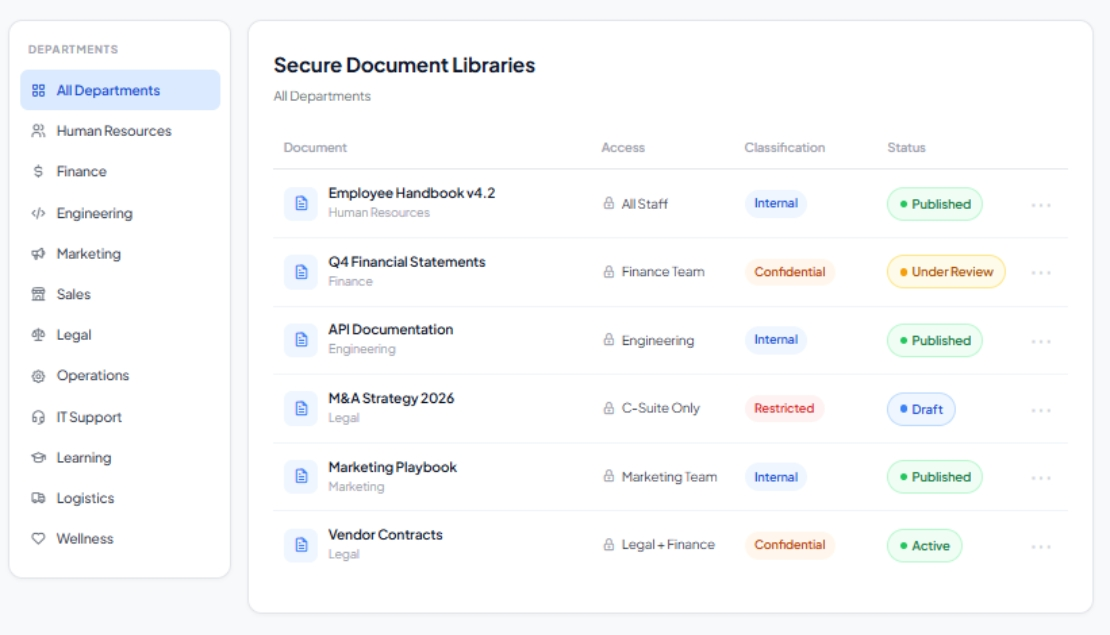
Manufacturing Enterprise Migration
Challenge
The organization operated a legacy SharePoint 2013 environment alongside multiple file servers. Employees struggled to locate documents, while IT teams spent significant time managing infrastructure and permissions.
Solution
Our migration team performed a complete content audit, redesigned information architecture, cleaned obsolete data, and migrated content to SharePoint Online using a phased migration strategy.
Business Impact
• 98% migration accuracy
• Less than 2 hours planned downtime
• 30% faster document retrieval
• Reduced infrastructure maintenance costs
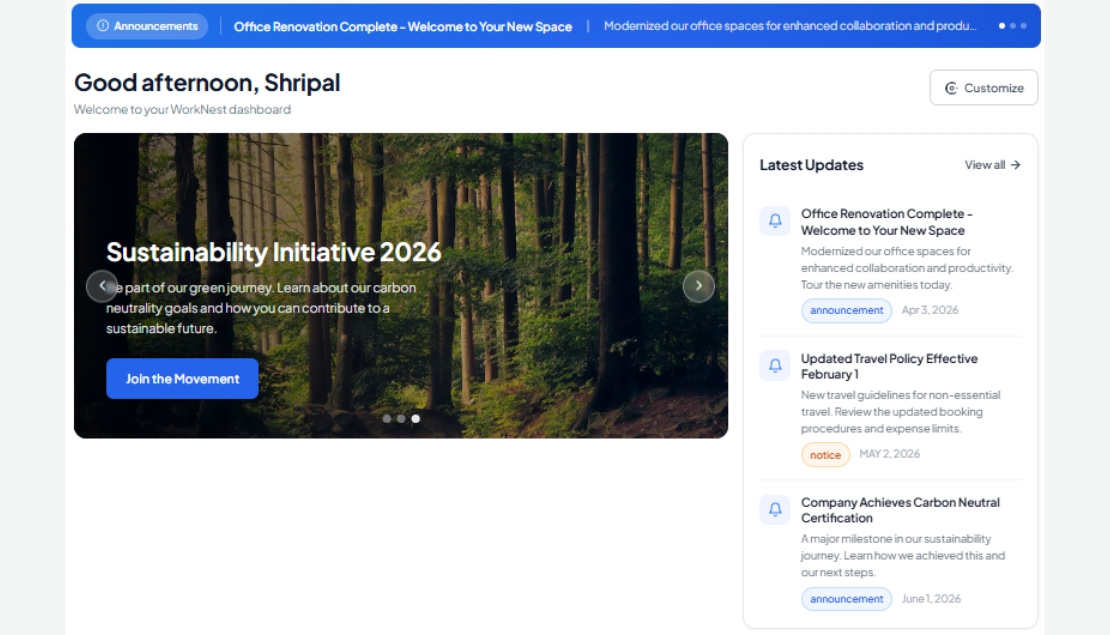
Healthcare Provider Modernization
Challenge
Patient administration documents, policies, and operational resources were distributed across multiple legacy systems, creating compliance risks and inefficiencies.
Solution
We migrated content to SharePoint Online, implemented metadata governance, and integrated Microsoft Teams for secure collaboration.
Business Impact
• 100% document integrity maintained
• Improved compliance readiness
• Faster access to critical documentation
• Enhanced collaboration across departments
Financial Services Migration
Challenge
Legacy workflows and disconnected document repositories slowed operational processes and increased audit complexity.
Solution
Implemented SharePoint Online migration combined with workflow modernization using Power Automate.
Business Impact
• 45% faster approval processes
• Improved audit visibility
• Enhanced document governance
• Reduced manual administrative effort
Educational Institution Migration
Challenge
An aging SharePoint environment created performance issues and limited collaboration capabilities.
Solution
Migrated sites, documents, permissions, and collaboration resources to SharePoint Online while modernizing user experience.
Business Impact
• Over 1 million documents migrated
• Zero critical data loss
• Improved collaboration between departments
• Increased platform adoption
Multi-Location Retail Organization
Challenge
Multiple branches relied on disconnected systems for document sharing and communication.
Solution
Implemented SharePoint Online as a centralized platform integrated with Microsoft Teams and governance controls.
Business Impact
• Centralized information management
• Improved employee communication
• Faster access to operational resources
• Increased collaboration across locations
Government Agency Migration
Challenge
Legacy SharePoint infrastructure required modernization while maintaining strict compliance standards.
Solution
Executed a controlled phased migration strategy with governance planning and compliance-focused architecture.
Business Impact
• Improved compliance management
• Enhanced security controls
• Reduced infrastructure complexity
• Increased operational efficiency
Industries We Support
Our SharePoint migration consultants have experience supporting organizations across multiple industries.
Healthcare
Support secure migration of administrative content, policy documentation, and regulated information.
Financial Services
Improve governance, auditability, compliance, and information management.
Manufacturing
Migrate engineering documentation, quality management records, SOPs, and operational content.
Real Estate
Centralize property of the documentation, contracts, and the collaboration of resources.
Education
Modernize intranets, departmental collaboration, and knowledge management systems.
Government
Support secure, compliance-driven migration projects for public sector organizations.
What Our Clients Say
The AscenWork team helped us migrate from SharePoint 2013 to SharePoint Online while preserving document history.

Suresh Poojary
AscenWork delivered a seamless SharePoint Online migration and helped our teams adopt the new environment with minimal disruption.

Pravin Lohar
The migration was completed on schedule with excellent communication throughout the project.

Shyam Mehta
It was a pleasure to be associated with AscenWork Team. The team helped our organizations to put up a great Application.

Ameya Kannamwar
How Much Do SharePoint Migration Services Cost?
SharePoint migration costs depend on content volume, number of sites, workflows, customizations, governance requirements, and migration complexity. Small migrations may take a few weeks, while enterprise migrations involving SharePoint Server, file servers, and Microsoft 365 tenant consolidation require detailed planning and phased execution. A migration assessment helps identify scope, risks, timelines, and the most cost-effective migration strategy.Frequently Asked Questions About SharePoint Migration
SharePoint migration is the process of moving documents, sites, permissions, workflows, metadata, and business content from older SharePoint environments, file servers, or third-party repositories into SharePoint Online. A successful migration also includes governance planning, information architecture improvements, user adoption, and post-migration optimization.
SharePoint Online provides cloud scalability, stronger security, automatic updates, Microsoft 365 integration, remote accessibility, and lower infrastructure management costs. Organizations also gain access to Microsoft Teams, Power Automate, Power Apps, Power BI, and Microsoft Copilot capabilities.
Most migration projects take between 4 and 16 weeks depending on data volume, complexity, workflow dependencies, governance requirements, and user adoption planning. Smaller migrations can often be completed faster, while enterprise environments typically require a phased migration approach.
Yes. Existing permissions, groups, and security structures can be migrated and optimized during the migration process. Our consultants also review permission models to improve governance and reduce security risks.
Legacy workflows often require modernization before migration. Our team evaluates existing workflows and rebuilds them using modern Microsoft technologies such as Power Automate, Power Apps, and SharePoint Online capabilities.
Yes. Depending on migration requirements and source systems, we can migrate version history, metadata, document properties, permissions, and content structures to ensure business continuity and compliance.
We use Microsoft SharePoint Migration Tool (SPMT), ShareGate, Microsoft 365 migration technologies, Power Platform tools, and custom migration strategies based on project requirements.
Yes. We help organizations migrate from SharePoint 2013, SharePoint 2016, SharePoint 2019, file servers, and other legacy systems to modern SharePoint Online environments.
Our migration methodology includes discovery workshops, content audits, architecture planning, pilot migrations, validation testing, user acceptance testing, and post-migration support. This structured approach helps reduce downtime and migration-related issues.
The cost depends on data volume, migration complexity, customizations, workflows, governance requirements, and business objectives. We typically begin with a migration assessment to understand project scope and provide accurate recommendations.
Let's Talk About Your SharePoint Migration Project
Migrating to SharePoint Online is an opportunity to improve collaboration, strengthen governance, modernize business processes, and create a future-ready digital workplace.