Your SharePoint Is Losing You 2 Hours Every Day – AI Can Fix That
AI-Powered SharePoint Intranet: Fix Daily Productivity Loss
Most Indian companies treat SharePoint like an expensive hard drive. The ones pulling ahead are using it very differently. You open SharePoint. You type the filename. Nothing useful comes up. So you open WhatsApp, message a colleague, and wait. Sound familiar? For most mid-sized companies in India, this is a daily ritual – and it is quietly destroying productivity. The good news is that an AI-powered SharePoint Intranet can change this completely, often within weeks, not months.

Average time lost per employee per day searching for information
SharePoint deployments that never go beyond basic file storage
ROI reported by companies using AI-integrated intranet portals
The good news? The fix isn’t a 12-month project anymore. With the right architecture, a company can go from “digital filing cabinet” to a genuinely intelligent intranet in 6–8 weeks.
Why SharePoint Feels Like More Work Than It Should
Here is the honest truth. SharePoint is not a bad tool. It is actually one of the most powerful platforms in the Microsoft 365 ecosystem. But most companies set it up once, upload a few folders, and walk away.
Over time, teams create their own workarounds. Files get emailed back and forth. Someone builds a separate Google Drive folder. A WhatsApp group becomes the real file repository. SharePoint becomes the place where documents go to be forgotten.
This is not a technology failure. It is an adoption failure. And the cost of that failure adds up faster than most people realise.
The Real Cost Nobody Actually Calculates
Most IT teams look at SharePoint and say, “It is working. Employees have access.” But access and adoption are very different things.
Think about it this way. If each of your employees spends just 1.5 hours per day searching for files, chasing approvals, or re-creating content that already exists – what does that look like at scale?
50 employees – 75 hours lost per day – 1,500+ hours per month 100 employees – 150 hours lost per day – 3,000+ hours per month 200 employees – 300 hours lost per day – 6,000+ hours per month
That is not a small inefficiency. That is a structural problem hiding in plain sight. The solution is not to train employees harder on SharePoint. The solution is to make SharePoint intelligent enough that employees actually want to use it.
50 Employees
75
Hours Lost / Day
1,500+ Hours / Month
100 Employees
150
Hours Lost / Day
3,000+ Hours / Month
200 Employees
300
Hours Lost / Day
6,000+ Hours / Month
What an AI-Powered SharePoint Intranet Actually Looks Like
This is where things get practical. An AI-powered SharePoint intranet is not a new product you buy. It is a smarter version of the SharePoint you already have, built on top of Microsoft 365 tools you are already paying for.
Natural Language Search
Employees type questions like "What is the leave policy for Diwali?" and get the right document instantly - no folder navigation needed.
AI-Generated Summaries
Long policy documents and meeting notes get an automatic three-line summary at the top. Understand key points without reading twelve pages.
Smart Notifications
Instead of generic alerts, employees receive: "The travel reimbursement process changed - here's what's different for you." Relevant and actionable.
Personalised Onboarding
New joiners get a day-by-day content feed tailored to their role - not a folder full of PDFs. Reduces the time to productivity significantly.
Live Dashboards
Power BI dashboards embedded directly into the intranet. KPIs are visible the moment a manager logs in - no digging through Excel reports.
A Real Example – From 30% to 84% Usage in 90 Days
Numbers on a page are one thing. A real case is another.
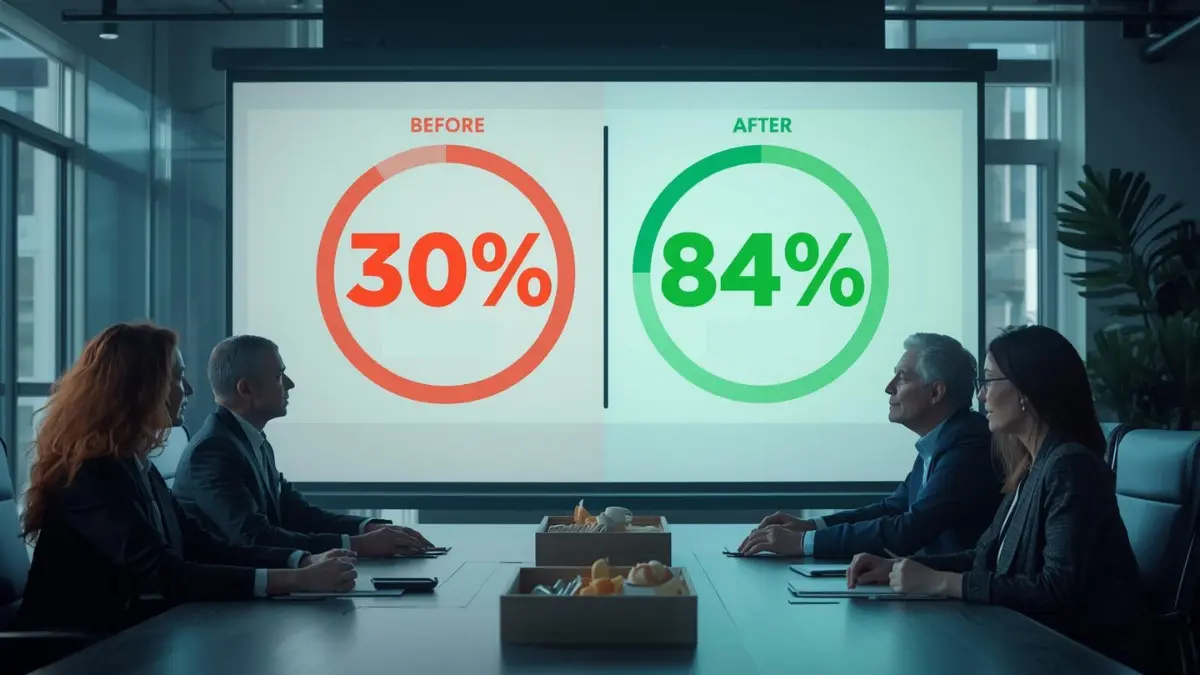
One of our clients – a 200-person manufacturing company – had SharePoint running for three years. Weekly active usage was below 30%. Most employees still emailed files to each other. The portal existed, but nobody trusted it.
After implementing an AI-powered SharePoint intranet with natural language search, smart notifications, and embedded Power BI dashboards, here is what changed within 90 days.
Weekly active usage jumped to 84%. Average document search time dropped from several minutes to a few seconds. The operations team estimated they recovered roughly 1.5 hours per employee per week. For 200 people, that translates to over 15,000 hours returned to actual work every year.
The technology did not change. The experience did.
The Tech Stack Behind It – All Inside Microsoft 365
A common concern we hear: does this require a completely new system?
The answer is no. The entire stack sits within Microsoft 365 – which most companies already pay for.
SharePoint SPFx Web Parts handle the custom UI – the branded homepage, department hubs, and personalised dashboards. Power Automate manages all workflow logic, approvals, and smart notifications. Azure OpenAI, now available in Indian data centre regions, powers natural language search, document summarisation, and Q&A. Power BI Embedded brings live analytics directly into the intranet instead of keeping data siloed in separate tools.
Everything runs inside Microsoft’s existing security model. No data leaves your tenant. No new compliance headaches. IT stays fully in control.
Is This Only for Large Enterprises?
Not anymore. This is the question we get asked most often – and the answer has changed significantly in the last two years.
Previously, an AI-integrated intranet was a project suited only for large enterprises with large budgets. Today, with pre-built SPFx components and a modular rollout approach, companies with 50 to 500 employees can achieve most of the same outcomes at a fraction of that cost.
The approach we use for mid-market companies is a phased rollout – starting with the highest-friction pain points like search and announcements – then expanding from there. Most clients see measurable results before the second phase even begins.
If your company is in that 50 to 500 employee range, this is absolutely relevant to you.
Where to Start This Week – A 4-Step Audit
You do not need a consultant to take the first step. Here is how to assess your current SharePoint situation on your own.
Check your usage analytics
Open the SharePoint Admin Centre and look at weekly active users. If it is below 50%, you have a structural problem - not a training problem.
Identify your top three friction points
Ask five employees: where do you waste the most time with SharePoint? The answers will almost always point to search, onboarding, and announcements - also where AI delivers the fastest visible wins.
Review your Microsoft 365 licence
E3 and above includes most of what is needed for the AI layer. Before budgeting for anything new, confirm what you already have - you may be sitting on untapped capabilities.
Talk to someone who has actually built this
Implementation details matter far more than the technology choice. Look for a partner with real deployment experience - not just someone who resells licences.
Have a question? check these answers.
No, it does not. In fact, the implementation works on top of your existing SharePoint environment. Therefore, there is no data migration required. Furthermore, employees can continue using the system throughout the entire process without any interruption.
With a modular approach, the first phase covers search, announcements, and the homepage. As a result, this phase typically goes live in 6 to 8 weeks. However, the full rollout depends on the scope and number of departments involved. In other words, the more departments you include, the longer the overall timeline.
Azure OpenAI is available in Indian data centre regions. Your data stays within your Microsoft tenant and does not leave your environment.
That is actually the point. An AI-powered intranet is designed to be simpler – not more complex. Natural language search means employees do not need to know where files are stored. They just ask a question and get an answer.
Not for day-to-day use. The system is built on Microsoft’s managed infrastructure. Most administrative tasks can be handled by a non-technical site owner once the initial setup is complete.
AI-powered SharePoint Intranet
We offer a free 30-minute SharePoint assessment – no pitch, no pressure. Just an honest look at your current setup and where the biggest gains are.