How to Speed Up Leave Approval Processing with SharePoint Workflows
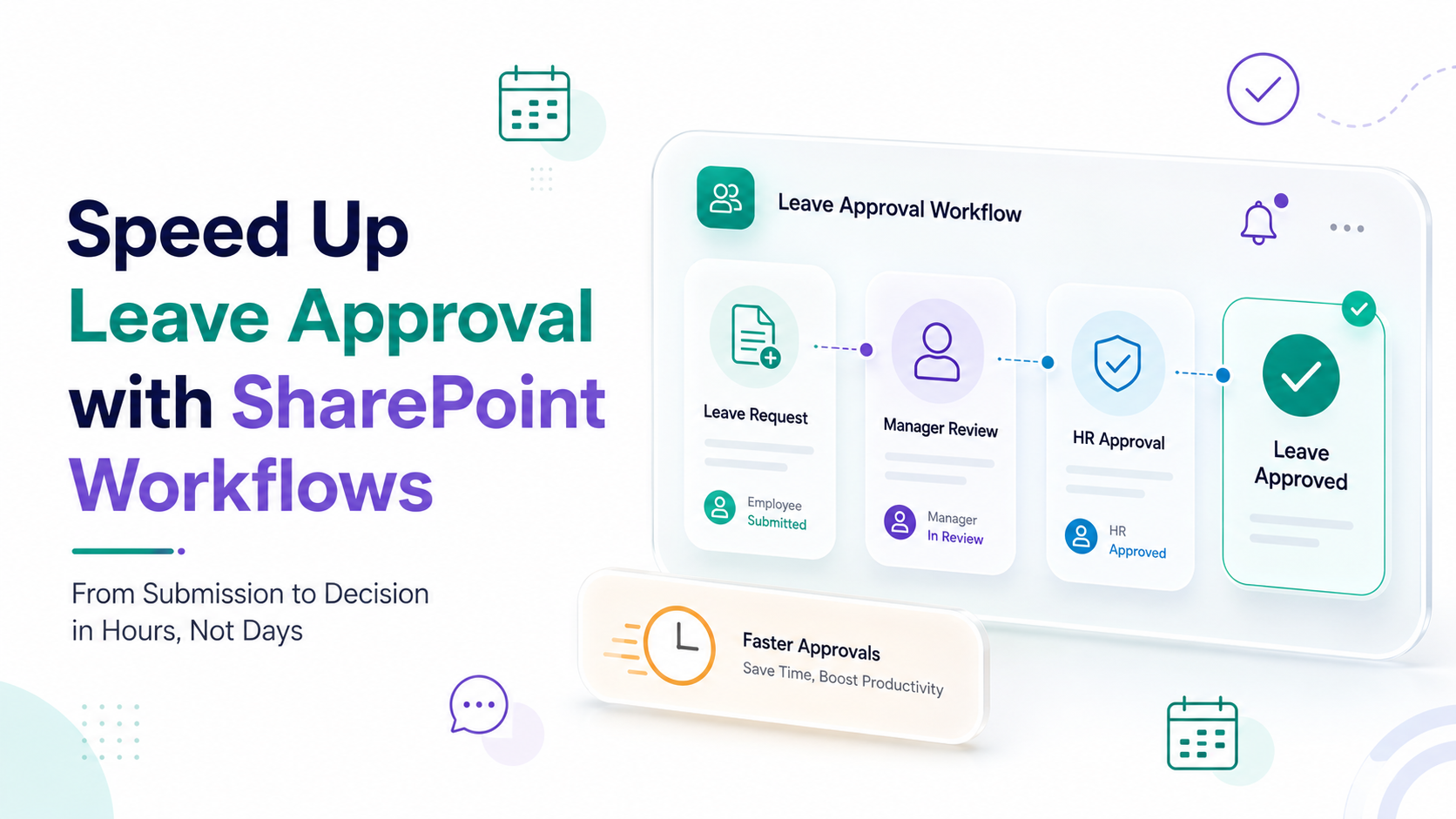
Leave approval speed is a critical pain point for most organizations managing distributed teams, yet many HR departments still rely on email chains, spreadsheets, and manual follow-ups. When managers juggle dozens of pending leave requests across email, Teams, and assorted messaging platforms, bottlenecks form quickly, employees grow frustrated, and compliance visibility disappears. The good news is that workflow optimization through SharePoint Approval Workflows can transform your leave management from a bottleneck into a streamlined, transparent process that moves requests from submission to decision in hours instead of days.
Key Takeaway
Eliminating manual approval steps with SharePoint workflows reduces request-to-decision time from days to hours while improving compliance visibility and employee satisfaction.
In This Article
- Why Fast Leave Approvals Matter to Modern Organizations
- The Core Challenge: Why Leave Approvals Drag
- The Solution: Workflow Optimization with SharePoint Approval Workflows
- Why Leading Organizations Choose SharePoint for Leave Approvals
- Industry Applications & Use Cases
- How to Get Started with Leave Approval Workflow Optimization
- Frequently Asked Questions

Why Fast Leave Approvals Matter to Modern Organizations
The workplace has fundamentally changed. Remote and hybrid work models have fragmented approval chains across time zones and communication platforms. Organizations still stuck with manual leave approval processes are losing competitive edge to faster, more responsive competitors who can make quick decisions. According to SHRM’s latest HR Technology Trends report, approval delays rank among the top five frustrations HR teams face, and it directly impacts employee satisfaction and retention.
“62% of HR professionals report that manual approval workflows create significant delays in decision-making and employee onboarding timelines.”
Society for Human Resource Management (SHRM), 2024
The business impact is real. Delayed leave approvals create cascading problems: employees get frustrated waiting for decisions, managers can’t plan team capacity when they don’t know who’ll be absent, finance teams face payroll complications when approvals arrive after the pay period begins, and compliance auditors flag the lack of centralized records as a governance risk. On top of that, slow approval processes send a signal to high-performing employees that your organization is running on outdated, inefficient systems, which drives talent turnover in competitive markets.
Fast, transparent leave approvals signal that your organization values employee experience and operates with modern efficiency standards. That matters for recruitment, retention, and operational confidence.
The Core Challenge: Why Leave Approvals Drag
Manual leave approval processes fail in predictable ways. Here’s what we see most often.
- No centralized record. Email and chat-based approvals scatter requests across multiple platforms. Approvers miss messages in crowded inboxes. Employees can’t track request status without sending follow-up emails.
- Approver unavailability. When an approver is themselves on leave, out sick, or buried in meetings, requests sit pending with no escalation path. Re-routing to someone else requires manual re-submission.
- Multi-level approval chaos. Requests needing sequential approval from manager, then department head, then HR require each approver to manually forward the request. Multiple hand-offs create multiple failure points.
- Zero visibility for employees. Employees have no way to know if their request is being reviewed, approved, or lost. This triggers repeated follow-up emails and support calls.
- Compliance gaps. When approvals happen via email or chat, audit trails are incomplete. You can’t easily prove who approved what, when, or based on what policy. That exposes you to compliance risk if labor laws or internal policies get questioned.
- Timezone and asynchronous delays. Global and remote teams face compounded delays because approvers may not be online when requests arrive. Manual processes have no mechanism for asynchronous approval.
The consequence is clear: slow approvals harm employee morale, complicate payroll and staffing, and expose organizations to compliance risk. Worth noting: HR support teams waste enormous energy on status-check requests and re-submissions that shouldn’t happen in the first place.
The Solution: Workflow Optimization with SharePoint Approval Workflows
Automated leave approval speed improves dramatically when you eliminate manual routing and introduce intelligent workflow logic. SharePoint Approval Workflows address each pain point above by creating a centralized, rule-based approval process that routes requests intelligently, notifies approvers automatically, and creates an auditable record of every decision.
Here’s how automated workflows solve the problem:
- Centralized approval hub. All leave requests live in one SharePoint list. Employees submit once. Approvers see all their pending approvals in one place. Status is always visible.
- Conditional routing. Workflow logic routes requests to the correct approver automatically based on department, leave type, or cost center. No manual forwarding. The system knows who should approve what.
- Audit trail & compliance. Every approval, rejection, or comment is timestamped and recorded. You can prove full compliance history for regulators, auditors, and internal policy reviews.
- Real-time status visibility. Employees see their request status update automatically as it moves through approval stages. Managers see all pending approvals across their team in dashboards.
- Escalation & delegation. If an approver is unavailable, the system can automatically escalate to the next level after a set time. Approvers can delegate authority to a colleague if needed, and the workflow follows the delegation rule.
- Notifications across Teams and Outlook. Approvers get notifications directly in Microsoft Teams or Outlook. They can approve from the notification without opening a separate system. This increases response speed significantly.
Expert Perspective
In our work with clients, the real power of workflow automation isn’t just speed, it’s reliability and visibility. Automated routing eliminates human error where emails get missed, requests go to the wrong person, or approvers forget about pending decisions. We’ve consistently seen organizations reduce follow-up emails by 70% simply by implementing centralized, automated workflows because everyone knows the status without asking.
Here’s the thing though: implementing leave approval speed improvements through SharePoint requires more than just configuring the tool. Your success depends on clear process design, approver training, and ongoing support. That’s why organizations should partner with experienced consultants who understand both HR processes and SharePoint configuration. A partner who can map your current bottlenecks, design the right approval logic, and guide your team through change management will deliver far better outcomes than a vendor who simply deploys software.
Why Leading Organizations Choose SharePoint for Leave Approvals
Not all approval workflow platforms are created equal. SharePoint stands out for organizations already invested in Microsoft 365. Here’s how it stacks up.
| Factor | SharePoint Approval Workflow | Generic Email or Spreadsheet Process | Standalone Approval Software |
|---|---|---|---|
| Processing Time & Visibility | Hours; real-time status dashboard | Days; no visibility without asking | Hours; but requires learning new platform |
| Compliance & Audit Trail | Complete timestamped record; policy-enforced routing | Ad-hoc records; no enforcement; audit nightmare | Good records; but siloed from HR data |
| Scalability & Integration | Scales with org; integrates Teams, Outlook, Power Automate, HR systems | Breaks down as org grows; manual workarounds | Scales well; integration depends on vendor |
| Cost & Implementation | Low licensing (included in M365); faster setup for existing customers | Free but unsustainable; high hidden labor cost | Higher licensing; longer implementation; vendor lock-in |
Three factors make SharePoint the choice for many organizations seeking to improve leave approval speed without introducing new platforms.
First, integration with Microsoft 365. SharePoint connects seamlessly with Teams, Outlook, OneDrive, and Power Automate. Approvers receive notifications in the tools they already use daily. Employees submit requests from a familiar portal. No new login credentials or platform learning curve. This simplicity drives adoption and faster time-to-value.
Second, flexible approval logic. SharePoint Approval Workflows support conditional routing, parallel and sequential approvals, delegation rules, and escalation paths customizable to your exact organizational structure. Whether you need manager approval only, or a multi-stage review chain (manager, department head, finance, HR), the system configures to match your reality. And here’s the thing: you can create different approval rules for different leave types, cost thresholds, or departments without building separate systems.
Third, built-in compliance and governance. SharePoint maintains complete audit logs, supports retention policies, and enforces role-based access control for sensitive leave data. Organizations in regulated industries, like healthcare, finance, and government, benefit significantly from this foundation. Moreover, when auditors request approval documentation, you can generate comprehensive reports with timestamps, decision rationale, and approver identity.
It’s important to note that SharePoint Approval Workflows aren’t a replacement for dedicated HR software like Workday or SuccessFactors. Instead, they form an operational layer that automates the approval decision-making process and then integrates with your HR system to update leave balances and trigger payroll. That’s why the best implementations combine SharePoint’s approval workflow strength with your existing HR software’s leave management and reporting capabilities.
Industry Applications & Use Cases
Leave approval workflows solve common problems across multiple industries. Let’s look at practical examples.
Finance & Accounting
Finance teams often require multi-level approval for leave, especially for senior staff or high-cost absences, to ensure payroll accuracy and budget planning. A request flows from team member to manager for initial approval, then to the department head to confirm capacity, then to HR to process the leave balance and payroll adjustment. On top of that, the workflow can automatically flag requests exceeding certain cost thresholds for additional review. The complete audit trail satisfies auditors who require documented approval chains.
Healthcare & Operations
Shift-based organizations like hospitals and emergency services face critical staffing challenges. A leave request must route to the shift supervisor and simultaneously trigger a coverage check. If the system detects understaffing risk, it can escalate for manual review or suggest alternative dates. And here’s the thing: real-time visibility to all approved leave enables operations managers to build accurate staff schedules without surprises. That prevents dangerous understaffing and improves patient safety.
Technology & Remote Teams
Distributed tech teams span multiple time zones. Traditional sequential approvals create bottlenecks where a request waits for an approver who’s offline. SharePoint workflows support asynchronous approvals and automatic escalation after a set time window, ensuring no request gets stuck waiting for one approver. Plus, self-service status tracking in a centralized portal reduces support requests significantly because employees see live request progress without emailing HR.
Manufacturing & Logistics
Production-focused organizations need approval routing based on department and shift. A warehouse worker’s leave approval may require shift supervisor sign-off plus integration with production schedules to avoid bottlenecks. That means conditional routing logic ensures approvals follow the organizational structure without manual re-routing, and managers have visibility into approved absences weeks in advance for better planning.
How to Get Started with Leave Approval Workflow Optimization
Improving leave approval speed follows a structured, five-step approach. Each step builds on the previous one.
- Map Your Current Process. Document every step, decision point, and person involved in today’s leave approval cycle. Identify where delays occur, which requests get lost, and where approvers struggle. Outcome: a clear baseline showing exactly where your bottlenecks are and which groups are most affected.
- Define Approval Rules & Routing Logic. Determine who approves what based on department, seniority, leave type, and cost. Decide whether approval stages should be sequential (one person approves, then the next) or parallel (multiple approvers review simultaneously). Plan escalation paths for when approvers are unavailable. Outcome: a documented approval workflow that is fair, transparent, and aligned with your organizational structure and compliance requirements.
- Configure SharePoint Approval Workflows. Set up automated request routing, notification rules, delegation options, and escalation paths. Create approval forms that capture necessary information. Test the workflow with sample requests to identify and fix issues before rolling out to the full organization. Outcome: a live workflow environment that processes requests without manual intervention.
- Train & Change Manage. Educate all approvers on how to use the new system, where to find pending requests, and how to complete approvals. Communicate the benefits to employees so they understand why the new process exists. Gather feedback in the first weeks and refine based on real-world usage. Outcome: high adoption, employee confidence in the new system, and smooth operational transition.
- Monitor & Optimize. Track metrics like average approval time, request volume, approval abandonment rate, and escalations. Identify new bottlenecks that emerge as you scale. Gather stakeholder feedback and make incremental improvements. Outcome: a continuously improving workflow that adapts to your organization’s changing needs and delivers sustained efficiency gains.
Many organizations underestimate the importance of steps one and two. Rushing to configure technology without mapping current processes and clarifying desired rules leads to misconfigurations that don’t actually solve your real bottlenecks. The right SharePoint consulting partner helps you think through these steps deliberately, ensuring the workflow you build solves your actual problem, not a generic template problem.
Frequently Asked Questions
How much faster will approvals be with SharePoint workflows?
The speed improvement depends on your current process and specific bottlenecks. Generally speaking, most organizations see requests move from multiple days to a few hours by eliminating manual routing and enabling approvers to act from notifications in Teams or Outlook. The real gain is reliability and visibility, fewer missed requests, fewer follow-up emails, and automatic escalation when approvers are unavailable. Rather than estimate a specific timeframe, schedule a discovery call with a workflow expert who can analyze your current process and give you a realistic picture based on your organization’s structure.
Does SharePoint replace our HR software?
No. SharePoint Approval Workflows automate the approval decision-making process. Your HR software, like Workday, SuccessFactors, or ADP, manages leave balances, accruals, payroll integration, and compliance reporting. The two systems work together: SharePoint routes approval requests and creates audit records; your HR system updates leave balances and processes payroll. This separation of concerns, while automated, gives you the best of both worlds: fast, transparent approvals plus comprehensive HR functionality.
What if an approver is on leave?
Delegation rules allow approvers to assign their authority to a colleague for a set period. When the original approver is away, requests automatically route to the delegated person. Alternatively, the workflow can escalate to the next approval level after a configurable time, for example, if a manager hasn’t approved within 24 hours, it escalates to the department head. This ensures requests never get stuck waiting for one unavailable person.
How do we ensure compliance with labor laws around leave approval?
SharePoint workflows create a complete, timestamped audit trail showing who approved each request, when they approved it, and any notes or conditions attached. That’s exactly what regulators and auditors expect to see. However, the audit trail alone doesn’t guarantee compliance. Your organization must have clear leave policies aligned with local labor laws. That’s why you should consult your legal and compliance teams to ensure your approval rules, leave types, and documentation standards match your jurisdiction’s requirements. SharePoint provides the governance infrastructure; your policies ensure the substance.
Can we integrate leave approvals with our payroll system?
Yes, with configuration. When a leave request is approved in SharePoint, Power Automate can trigger updates to your payroll system, update leave balances in your HR software, or notify payroll personnel of upcoming absences. The integration path depends on your payroll platform’s capabilities and available APIs. Some organizations use SharePoint as the system of record for approvals, then manually update payroll systems daily or weekly. A technical assessment by your IT or consulting partner will clarify what integration is possible for your specific tools.
Ready to Streamline Leave Approvals?
Manual leave approval processes waste time, create compliance risk, and frustrate employees. SharePoint Approval Workflows transform this into a fast, transparent, auditable process that scales with your organization. The right implementation combines process clarity, intelligent workflow design, and strong change management. Partner with a team that understands both HR operations and SharePoint technology to ensure your workflow actually solves your real bottlenecks.
Optimize Your Leave Approval Process Today
Discover how SharePoint Approval Workflows can reduce approval time, improve compliance visibility, and enhance employee experience. Talk to our workflow automation specialists about your specific approval challenges.