

SharePoint, Power BI and Power Apps for infrastructure and real estate teams
We help infrastructure and real estate companies keep project and property documents in order, route approvals, check sites on a phone and report on projects and portfolios, built in the Microsoft 365 you already use.
Talk to a consultant about infrastructure and real estate
Trusted by teams at












What teams ask us for
What infrastructure and real estate teams ask us to build
Project files, site checks and approvals run across many people and locations. These are the tools infrastructure and property teams ask us to build most often.
Project and property documents
Drawings, contracts and approvals filed by project or property, with versions and access by role.
Document management →Contracts and agreements
Contract records, review steps and approvals with a clear history.
Contract management →Vendor and purchase approvals
Vendor onboarding, purchase requests and approvals that route to the right people.
Procurement management →Site checks and snag lists
Inspections and defects captured on a phone or tablet, with photos and follow-up.
Power Apps development →Project and portfolio dashboards
Progress, cost, occupancy and collections in one clear view, from the data you already hold.
Power BI development →Facility requests and assets
Service requests, asset records and meeting room bookings for offices and buildings.
Asset management →How we work
Set up for projects, sites and portfolios
We map your project and property workflow first, from tender to handover or lease. Then we build document control, approvals and reports around it.
- Project and property records togetherContracts, drawings and approvals sit with the project or property they belong to.
- Site teams and head officeSimple site forms on a phone feed the same figures head office sees.
- Approvals with a trailEach approval shows who has it, what they decided and when.
- Your data stays with youContent, security and sign-in stay in your tenant. We do not host your data.
Case studies
Infrastructure and real estate projects we have delivered
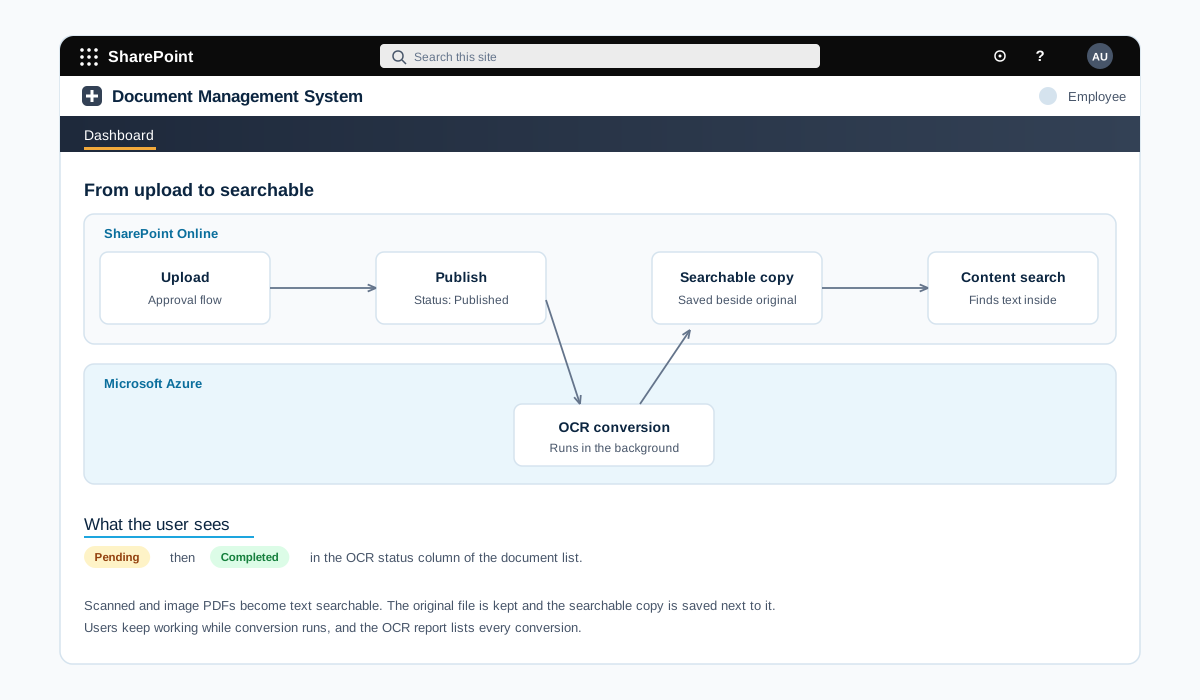
Azure OCR that makes scanned lease documents searchable in SharePoint
A document conversion module on Microsoft Azure, connected to SharePoint Online. Each published scan becomes a searchable PDF, so users can find the words inside long lease agreements.
A retail real estate company that keeps lease agreements as scanned PDFs
Read the case study →SharePoint · Infrastructure and real estate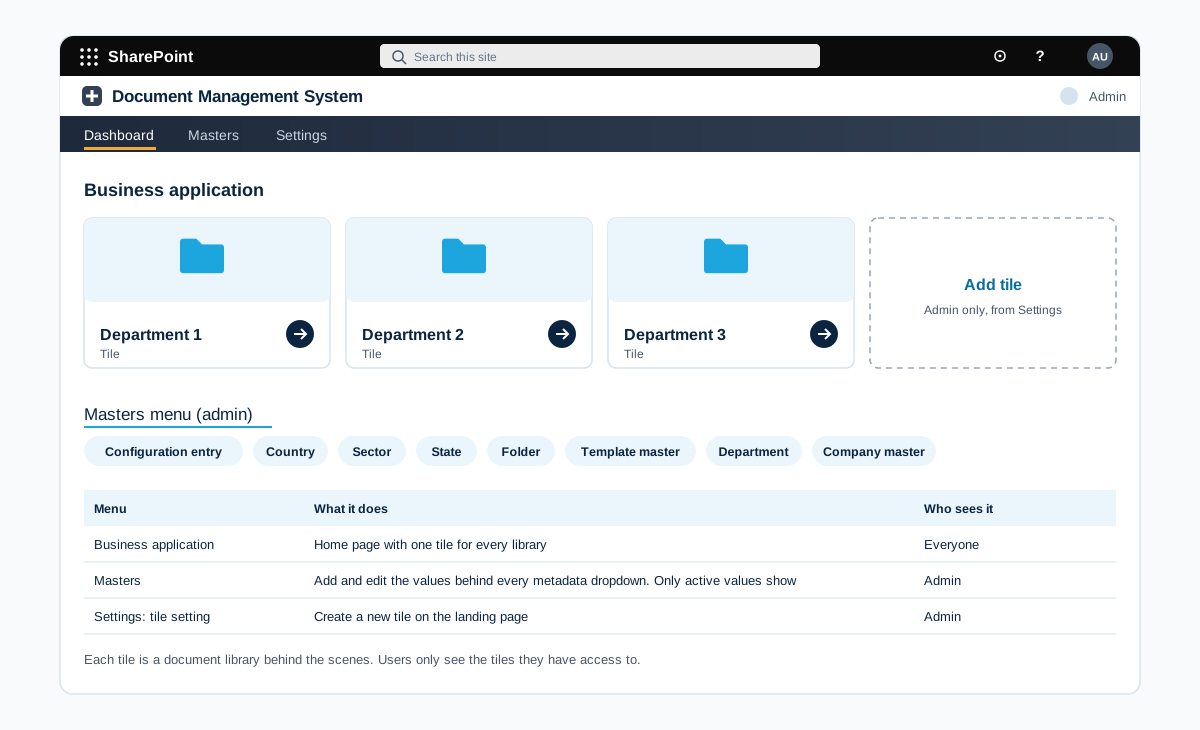
Configurable document management system where admins build their own libraries
A SharePoint document management system where admins create tiles, fields, folder templates and approval rules without a developer. Each new project gets its folders, approvers and permissions from a template.
A retail real estate company with several malls, each with leasing, finance and IT teams
Read the case study →Power Apps · Infrastructure and real estate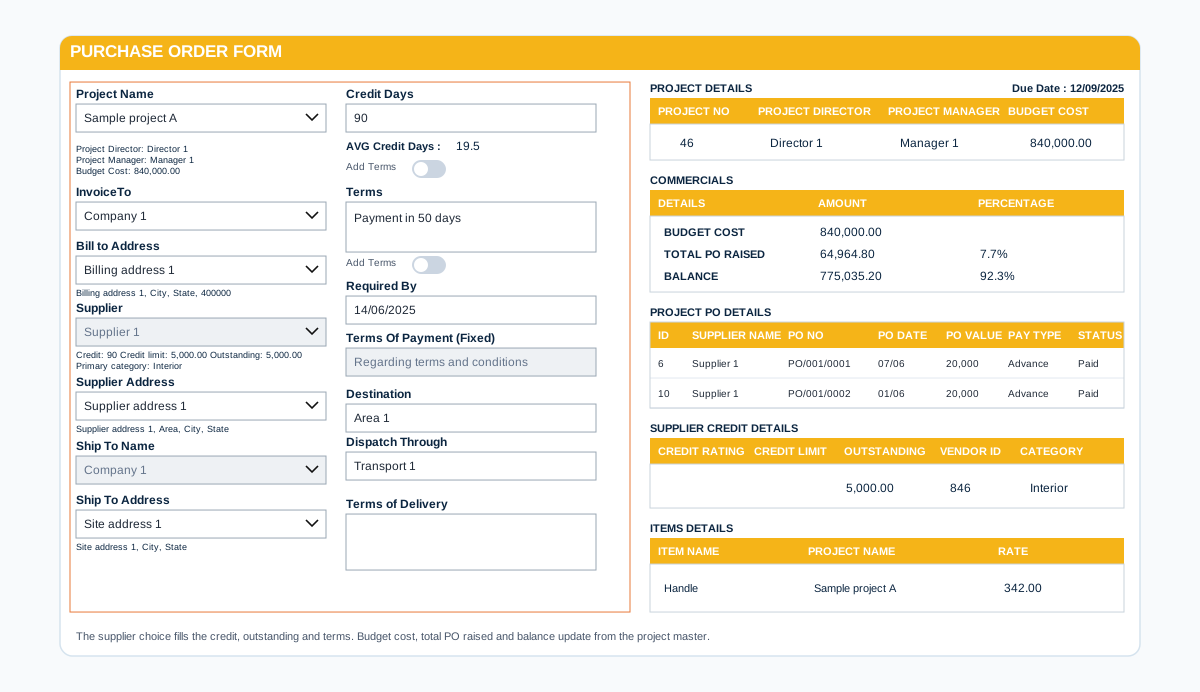
Power Apps procurement portal that controls purchase orders against project budgets
A Power Apps purchase order system for a construction company. Supplier and client masters feed the form, and live budget, credit and PO history panels guard every order.
A construction company running several projects with site teams, suppliers and a head office purchase team
Read the case study →Infrastructure and real estate: questions we hear often
Can site teams and outside parties use it?
Yes. We build forms that work on phones and tablets, and set up secure access for contractors, consultants and tenants so each person sees only what they should.
Have you worked in infrastructure and real estate?
Yes, we have worked with clients in this industry. We name clients and projects only with their approval, so we share details on a call or on our case studies page once approved.
Do you only build on Microsoft 365?
Our work is built on Microsoft 365 and the Power Platform: SharePoint, Power BI, Power Apps, Power Automate and Copilot. We connect them to your other systems where needed.
Where does our data stay?
In your own Microsoft 365 tenant and your own systems. We build inside your environment and do not copy your data to systems of our own.
How do we get a price?
Book a free consultation. After a short scoping call we send a proposal with one price for the core scope, separate prices for optional add-ons, and the assumptions written down.
Contact