

Power Pages portals for customers, vendors and partners
Power Pages is the Microsoft tool for secure websites and portals that use your business data. We design, build and support portals where outside users sign in, submit requests and see their own records, with the data kept in Dataverse.
Book a free consultation
Clients using Power Pages portals












What we build
Portals we build with Power Pages
Each one starts from a process your outside users already depend on, usually email, phone calls and spreadsheets.
Customer service portals
Customers raise requests, track status and see their own history without calling or emailing.
Vendor and supplier onboarding
Suppliers submit details and documents once, and your team reviews and approves in one place.
Partner and dealer portals
Partners register deals, download material and see only the records that belong to them.
Application and registration forms
Multi-step forms with validation, file uploads and a tracked approval behind them.
Self-service for members or staff
Profiles, bookings, certificates and requests for people who are not on your internal network.
Portals tied to your internal apps
The same Dataverse data feeds a Power Apps app for your team and the portal for outsiders.
How it fits together
One data store behind the portal and your internal tools
Power Pages sites use the same business data in Microsoft Dataverse as your Power Apps, Power Automate flows and Power BI reports, so the portal is not a separate system to reconcile.
- Sign-in for outside usersVisitors can be asked to sign in, so each person sees only the records they are allowed to see.
- Data in DataverseRequests and records land in tables your team already works with, with role and row level security.
- Workflows behind the formPower Automate routes each submission to the right person, sends reminders and keeps a record.
- Reports on portal activityPower BI shows volumes, turnaround times and where requests get stuck.
How it works
How a portal project runs
You see a working portal early, so you react to something real before the full build.
Define the users and the job
We agree who signs in, what they must be able to do, and what your team does with each request.
Design the data and access
We set up the Dataverse tables, the roles and what each type of user can see.
Build and test
The pages, forms and flows, tested with a few of your real outside users.
Launch and hand over
Go live on your domain with training, notes and a support option after launch.
Before we build
What we decide before a portal is built
A portal puts your data in front of people outside your company, so the questions below come before any screen is drawn.
Who signs in
Customers, vendors or partners, and how each one proves who they are.
What they can see
Only their own records, never a neighbour’s.
What they can change
Which fields are read-only and which can be edited or added.
What happens inside
Who in your team is told and which Power Automate flow starts.
Abuse protection
Limits on repeated sign-ups and form submissions.
Support
Where a portal user goes when something does not work.
Case studies
Portal and form projects we have delivered
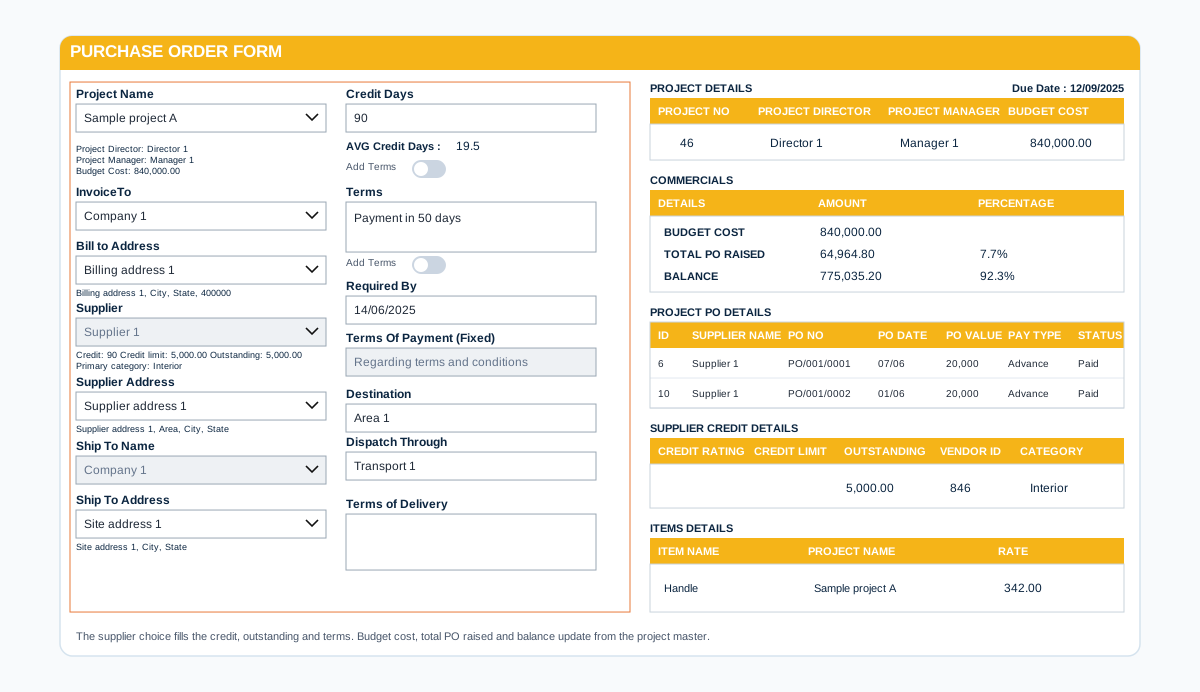
Access and data
Decide who signs in and what each person sees
A portal is only as safe as its visibility and table rules. We set those first, then design the pages.
- Sign-in and visibilitySet for each portal, so only the right people reach each page.
- Table permissionsOutside users can read and change only the records that belong to them.
- Data kept in your tenantStored in Dataverse or SharePoint under your own Microsoft 365.
- Requests routed to your teamForms and approvals reach the people who handle them.
Power Pages questions we hear often
What is Power Pages?
Power Pages is a Microsoft low-code platform for building and hosting secure, external-facing business websites. It is part of the Power Platform family and uses the same business data in Dataverse as Power Apps, Power Automate and Power BI.
When should we use Power Pages instead of a Power Apps app?
Use a Power Apps app for your own staff. Use Power Pages when the users are outside your organisation, such as customers, vendors or partners, and need to reach the data through a website with their own sign-in.
Do portal users need a Microsoft 365 licence?
No. Power Pages is licensed per website, with separate plans for signed-in users and for anonymous visitors. The exact plan depends on how many people use the site each month, so we size it with you on the first call.
Do we have to store the data in Dataverse?
Power Pages is built around Dataverse, so portal data normally lives there. If your records sit in SharePoint today, we explain what moves, what stays and what it means for cost before you decide.
Can people sign in with their existing accounts?
Power Pages supports sign-in through authentication providers. We agree the right option for your users, for example work accounts for partners or a social or local account for the public, during the design step.
Can the portal use our own branding and domain?
Yes. Power Pages starts from templates and a design studio, and we style the site to your brand and publish it on your own domain.
Can we try it before committing?
Microsoft offers a free 30 day trial site. We can build a small proof of concept on it so you see your own process working before you buy a plan.
How do we get a price?
Book a free consultation. After a short scoping call we send a proposal with one price for the core scope, separate prices for optional add-ons, and the assumptions written down.
Contact