

Power Apps that replace spreadsheets and email approvals
We build business apps and portals on Power Apps and connect them to your data and workflows. People get a simple screen on desktop or phone, and you get a tracked process instead of email and Excel.
Talk to a Power Apps consultant
Clients using Power Apps












What we do
Ways we work on Power Apps
Pick the one that matches where you are today. Many clients start with one and add another later.
Power Apps development
Custom apps and portals for requests, approvals, inspections, bookings and registers, built in your Microsoft 365.
Power Apps development →Workflow automation
Power Automate flows that route approvals, send reminders and connect your apps and data.
Power Automate →Power Platform consulting
A review of your apps, flows and environments, with a plan for governance and what to build next.
Power Platform consulting →Copilot Studio agents
Agents that answer questions and start requests from your apps and documents.
Copilot Studio →Ready-made products
Ready products built on the Microsoft platform that you can adjust to your process.
Products →Dedicated developers
Power Apps developers who work as part of your team, month to month.
Hire Power Apps developers →Where to start
Where to start with Power Apps
Match your situation to a starting point. If none fits, send us a note and we will point you the right way.
We run a process on email and Excel
Requests and approvals are tracked by hand.
Start with development
Approval workflow product →Approvals get stuck
Nobody knows where a request is.
Start with workflow automation
Approval flows →Staff need to submit from their phone
Field teams, plant floors and sites.
Start with a mobile app
SharePoint list forms →Apps were built by many people
Nobody owns them or knows what they connect to.
Start with consulting
Governance review →We need a portal for outside users
Customers, vendors or partners.
Start with a portal
Power Pages development →We need extra hands
The roadmap is clear but you need more delivery capacity.
Add dedicated developers
Staff augmentation →How we work
Start with the process, then build the app
We map how the work really happens, then build the smallest app that fixes it. The people who scope your project also build it.
- Built in your own Microsoft 365Apps, data and sign-in stay in your tenant. We do not host your data.
- Working screens earlyYou react to something real before the full build.
- Security by rolePeople see and change only what their role allows.
- Handed over cleanlyYour team gets training, notes and the files.
Case studies
Power Apps projects we have delivered
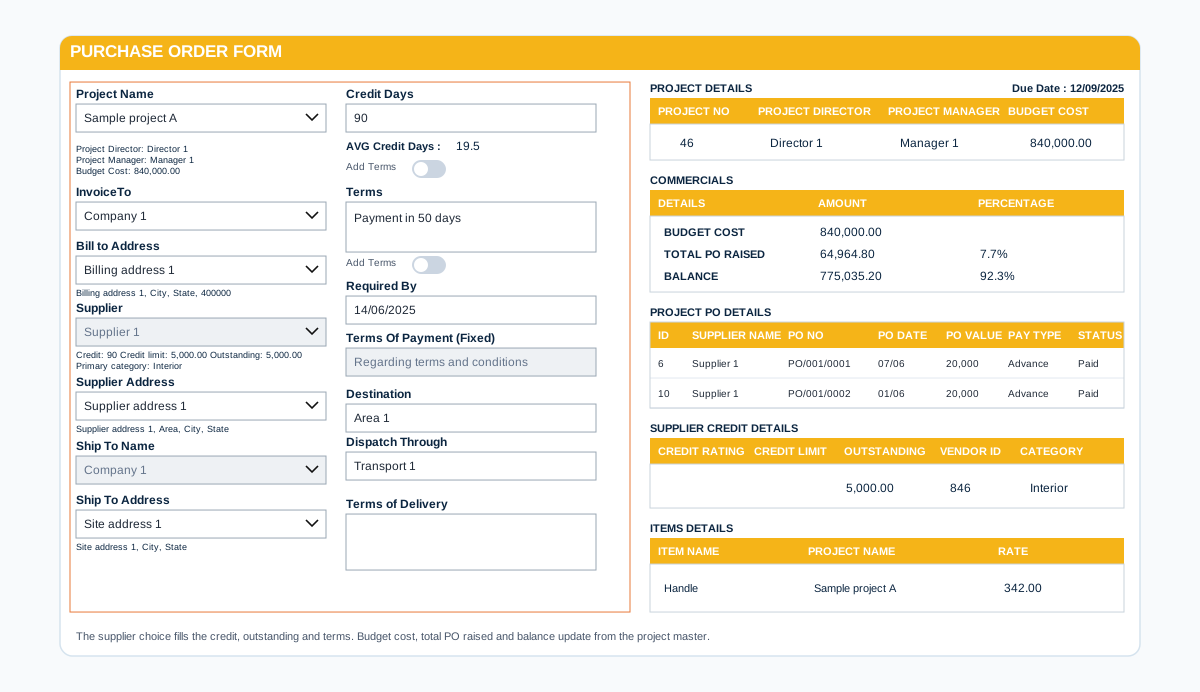
Data before screens
Decide where the data lives before the first screen
The data model decides how an app behaves when it grows. We settle it before we design the screens.
- SharePoint list or DataverseChosen from the process, the volume and the security needs.
- Roles planned earlyWho can view, create and approve, written down before the build.
- Tested on the phones your staff useScreens checked on the devices people carry on site.
- Changes loggedEach change recorded, so it is easy to explain and to undo.
Power Apps questions we hear often
What is Power Apps used for?
Power Apps is used to build business apps without starting from a blank codebase: forms, request and approval apps, inspection checklists, registers and portals. They work on desktop and phones and connect to data such as SharePoint, Dataverse and SQL.
Do all users need a licence?
It depends on the apps and the data they use. Some apps use licences you already have in Microsoft 365, others need Power Apps licences. We check this on the first call and tell you before you commit.
What is the difference between canvas and model-driven apps?
Canvas apps give full control over the screen layout and suit forms and task apps. Model-driven apps are built around data in Dataverse and suit data-heavy business processes. We recommend one after understanding your process.
Can you build on the SharePoint data we already have?
Yes. Many apps start from SharePoint lists and libraries you already use, and move to Dataverse when the process needs it.
Can we start small?
Yes. Most clients start with one process, see it working, and then add more.
How do we get a price?
Book a free consultation. After a short scoping call we send a proposal with one price for the core scope, separate prices for optional add-ons, and the assumptions written down.
Contact