

Power Platform that connects your apps, workflows and data
Microsoft Power Platform is a set of tools for building business apps, automating workflows, analysing data and creating AI agents with little code. We help you pick the right tools, build what you need on your own Microsoft 365, and keep it under control as it grows.
Talk to a Power Platform consultant
Clients on Power Platform












What we do
The Power Platform tools we build with
Pick the one that matches where you are today. Many clients start with one and add another later.
Power Apps
Business apps and portals for requests, approvals, inspections and registers, on desktop and phone.
Power Apps services →Power Automate
Workflows that route approvals, send reminders and move data between your systems.
Power Automate services →Power BI
Dashboards and reports on your sales, finance, operations and people data.
Power BI services →Copilot Studio
Agents that answer questions and start requests from your documents and systems. Formerly Power Virtual Agents.
Copilot Studio agents →Power Platform consulting
A review of the apps, flows and environments you already have, with a plan for governance and what to build next.
Power Platform consulting →Dedicated developers
Power Platform developers who work as part of your team, month to month.
Hire Power Apps developers →Where to start
Where to start with Power Platform
Match your situation to a starting point. If none fits, send us a note and we will point you the right way.
Work runs on email and Excel
Requests, approvals and registers are tracked by hand.
Start with an app
Power Apps development →Approvals and handovers get stuck
Nobody knows where a request is.
Start with a workflow
Power Automate development →Reports take days to prepare
Numbers sit in several files and systems.
Start with a dashboard
Dashboard planning guide →Staff build apps on their own
Nobody owns them or knows what they connect to.
Start with consulting
Governance for apps →We want an assistant for our teams
Answers from policies, documents and systems.
Start with an agent
Copilot Studio agents →We need a portal for outside users
Customers, vendors or partners who sign in.
Start with a portal
Power Pages development →Which Power Platform tool for which job
Most solutions use more than one tool. This is the usual starting point.
| You want to | Use | For example |
|---|---|---|
| Replace a spreadsheet or paper form with an app | Power Apps | Leave requests, inspections, asset registers, visitor logs |
| Move work between people and systems automatically | Power Automate | Approvals, reminders, copying data, filing documents |
| See your numbers in one place | Power BI | Sales pipeline, finance, operations and people dashboards |
| Answer questions from policies and documents | Copilot Studio | An HR or IT help agent in Teams or on a website |
| Give customers, vendors or partners a login | Power Pages | Vendor onboarding, service request or partner portals |
| Store business data with relationships and strict security | Dataverse (the data store behind the tools) | Data-heavy processes shared by several apps |
Where it helps
What teams build with Power Platform
These are common starting points. We scope each one to how your teams really work.
HR and people
Leave and onboarding requests, employee records, helpdesk questions and people dashboards.
Finance
Expense and purchase approvals, invoice tracking, budget and cash dashboards.
Operations
Inspections, checklists, incident reports, work orders and plant or site dashboards.
Sales and marketing
Lead and quote follow-up, pipeline and campaign dashboards, customer onboarding flows.
IT and facilities
Service requests, asset and access tracking, booking and visitor apps.
Compliance and quality
Audit checklists, document approvals, training records and corrective action tracking.
How we work
Start with the process, then pick the tool
We map how the work really happens, then use the smallest set of Power Platform tools that fixes it. The people who scope your project also build it.
- Built in your own Microsoft 365Apps, flows, data and sign-in stay in your tenant. We do not host your data.
- One platform, not four projectsApps, workflows, dashboards and agents can share data connections and sign-in, so they fit together.
- Working screens earlyYou react to something real before the full build.
- Handed over cleanlyYour team gets training, notes and the files, and each app and flow has an owner.
How it works
How a Power Platform project runs
You see working screens early, so you react to something real before the full build.
Walk through the process
We learn how the work happens today and where it gets stuck.
Choose the tools
We pick the smallest set of tools and the right data store, and confirm licences with you.
Build and test
The apps, workflows and reports, tested with your own users.
Roll out and hand over
Launch with training, notes and named owners, and support after go-live.
Governance
Keep Power Platform under control
Low-code makes it easy for anyone to build, which is good until nobody knows what exists. We set the rules so your teams keep building safely.
- EnvironmentsTest and live kept apart, with a controlled way to move changes across.
- Data policiesRules on which connectors can be used together, so business data stays in business tools.
- OwnershipEvery app and flow has an owner, so nothing stops when one person leaves.
- Licences and monitoringYou pay for what you use, and failed flows reach the right person.
Case studies
Power Platform projects we have delivered
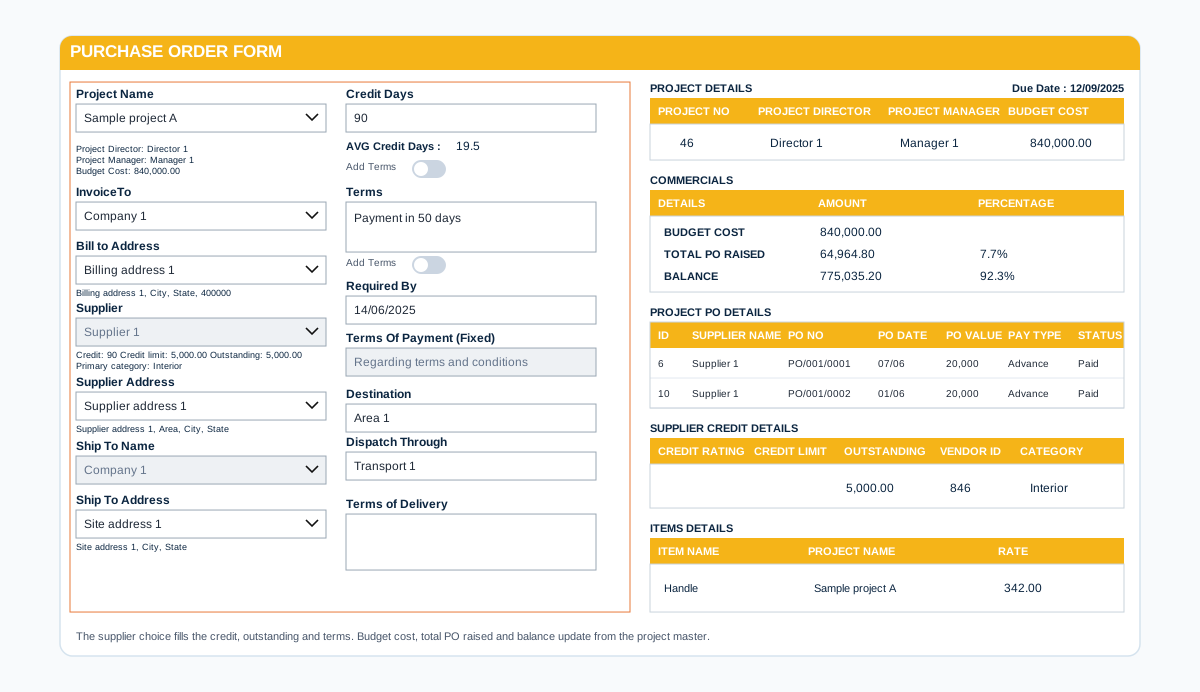
Environments and rules
Environments, data policies and owners are set up first
Apps and flows built without rules become hard to change and risky to run. These are set up before the first build.
- Separate environmentsDevelopment, test and live kept apart, so changes are tested before users see them.
- Data policiesConnectors grouped so business data cannot leak into services it should not reach.
- A named owner for each app and flowSomeone knows what each solution does and who can change it.
- Monitoring after go-liveUsage and failures watched, with a clear route to fix them.
Power Platform questions we hear often
What is Microsoft Power Platform?
Power Platform is a group of Microsoft tools for building business solutions with little code: Power Apps for apps and portals, Power Automate for workflows, Power BI for dashboards, Copilot Studio (formerly Power Virtual Agents) for AI agents and Power Pages for websites. They can share data connections and sign-in, so one solution can use several of them.
How is Power Platform different from Microsoft 365?
Microsoft 365 is the set of everyday tools such as Outlook, Teams, SharePoint and Excel. Power Platform sits alongside them and lets you build your own apps, workflows and reports on top of the data and sign-in you already have.
Can our own staff build with it, or do we need developers?
Both work. Simple apps and flows can be built by trained staff. Apps that touch several systems, handle sensitive data or need to last usually need a developer. We build the foundation and can train your people to extend it.
Do we need extra licences?
It depends on what you build and which data it uses. Some solutions run on licences you already have in Microsoft 365, others need Power Apps, Power Automate or Power BI licences. We check this on the first call and tell you before you commit.
Should the data live in SharePoint or in Dataverse?
SharePoint lists suit simple processes and data you already keep there. Dataverse suits data-heavy processes that need relationships, stricter security and larger volumes. Many solutions start in SharePoint and move when the process needs it.
What is the risk of letting everyone build apps?
Apps and flows multiply quickly. Without ownership, environments and data policies you get apps nobody understands, flows that fail quietly and data leaving through the wrong connector. A governance review sets the rules without stopping people from building.
Can you take over apps and flows that our staff already built?
Yes. We review what exists, tell you plainly what to keep, fix, retire or rebuild, and document the result so your team can run it.
Can you work with the Power BI and SharePoint we already have?
Yes. Most projects connect to SharePoint, Power BI, Teams and the systems you already use rather than replacing them.
How do we get a price?
Book a free consultation. After a short scoping call we send a proposal with one price for the core scope, separate prices for optional add-ons, and the assumptions written down.
Contact